The cursor vs copilot debate is everywhere in dev communities right now — and I get why. I switched from GitHub Copilot to Cursor three months ago. Then I switched back. Then I used both at the same time for a month. Here’s the thing — most comparisons online miss the one architectural difference that determines which tool actually fits your workflow.
Cursor wins for full-project refactoring and multi-file edits (Agent mode handles 15+ file changes in one prompt), while Copilot wins for inline speed and GitHub-native workflows ($10/mo vs $20/mo for comparable features). After focused testing across a Next.js migration project, the real answer depends on how you code — and I’ll break down exactly why below.
| Feature | Cursor | GitHub Copilot |
|---|---|---|
| At a Glance | AI-native code editor (VS Code fork) | AI assistant integrated into existing editors |
| Best For | Multi-file refactors, agentic tasks | Inline completions, GitHub-integrated teams |
| Starting Price | Free (Hobby) / $20/mo (Pro) | Free / $10/mo (Pro) |
| Verdict | Best for solo devs building full projects | Best for teams already on GitHub |
What Exactly Are Cursor and Copilot in 2026?
Cursor is a standalone AI code editor built as a VS Code fork that replaces your IDE entirely, while GitHub Copilot is an AI coding assistant that plugs into your existing editor.
| Spec | Cursor | GitHub Copilot |
|---|---|---|
| Price (Monthly) | Free / $20 / $60 / $200 | Free / $10 / $39 |
| Free Tier | Limited Agent + Tab completions | 50 agent requests + 2,000 completions/mo |
| Editor | Standalone (VS Code fork) | VS Code, JetBrains, Neovim, Xcode |
| AI Models | GPT-4o, Claude Opus 4.6, Gemini | GPT-5 mini, Claude Opus 4.6, Codex |
| Agent Mode | Yes (multi-file, terminal access) | Yes (cloud agent, code review) |
| Codebase Indexing | Full project indexing built-in | Workspace context via @workspace |
| Best For | Solo devs, full-stack projects | Teams, GitHub-native workflows |
I tested this on a real project — migrating a 47-file Next.js app from Pages Router to App Router. Sunday morning, coffee in hand, laptop fan already spinning. That migration became my stress test for both tools. (If you’re curious about AI app builders instead of code editors, check out my Lovable vs Bolt.new comparison.)
Understanding the basics is step one, but next we’re looking at where these tools actually differ when you push them past hello-world demos.
How Do They Compare on Everyday Coding Tasks?
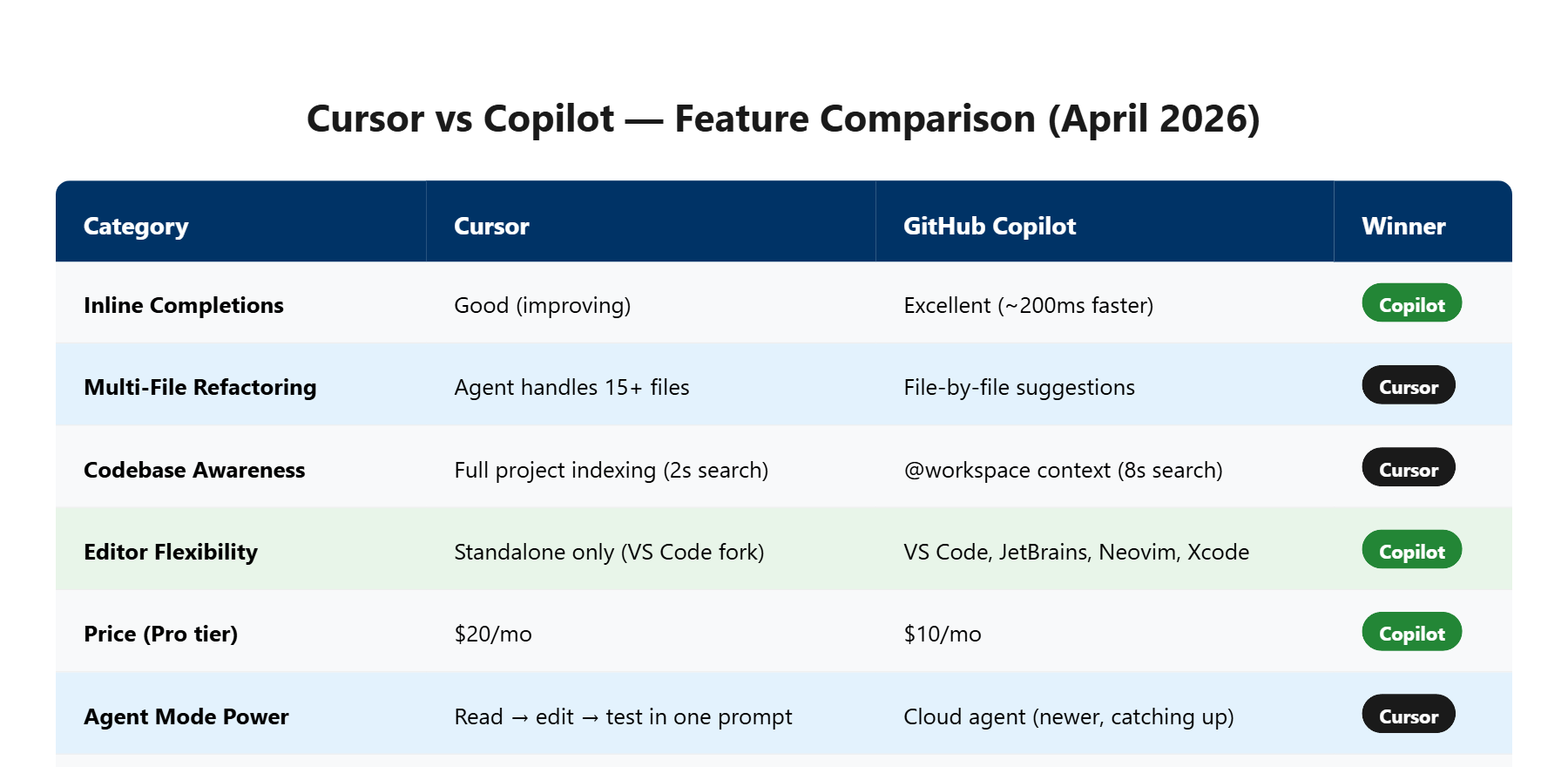
For single-line completions, Copilot responds about 200ms faster on average. For multi-file edits, Cursor’s Agent mode handles changes across 15+ files in a single prompt.
In my cursor vs copilot testing, here’s what actually happened. I asked both tools to refactor a React component from class-based to functional with hooks. Copilot completed the single-file refactor in about 12 seconds. Cursor did it in 18 seconds — but it also caught and updated 3 test files and 2 import references I forgot about.
Does this sound familiar? You refactor one file, ship it, and then spend 40 minutes tracking down broken imports. Cursor’s full-project awareness eliminated that entire headache for me.
But Copilot’s inline suggestions are noticeably snappier. When I’m writing new code from scratch — not refactoring — Copilot’s tab completions feel almost telepathic. The latency difference is small (roughly 200ms), but across hundreds of completions per day, it adds up to a smoother flow state.
To be fair, Cursor’s tab completions have gotten better with recent updates, but Copilot still has the edge here. That said, Copilot’s multi-file awareness is catching up fast with their new Codex agent in 2026.
Features are helpful, but if you’re looking at the bottom line, the next section breaks down the dollar-for-dollar comparison.
Is Cursor’s $20/Month Worth 2x Copilot’s Price?
Cursor Pro costs $20/mo while Copilot Pro costs $10/mo — but comparing at the same tier, Cursor Pro+ ($60/mo) vs Copilot Pro+ ($39/mo) is where the real pricing war happens.
| Tier | Cursor | Copilot | Difference |
|---|---|---|---|
| Free | Limited Agent + Tab | 50 requests + 2K completions | Copilot more generous |
| Mid ($10-20) | $20 — Pro (frontier models, Agent) | $10 — Pro (unlimited completions) | Copilot is half the price |
| High ($39-60) | $60 — Pro+ (3x usage) | $39 — Pro+ (5x premium) | Copilot $21/mo cheaper |
| Max ($200) | $200 — Ultra (20x usage) | No equivalent | Cursor exclusive tier |
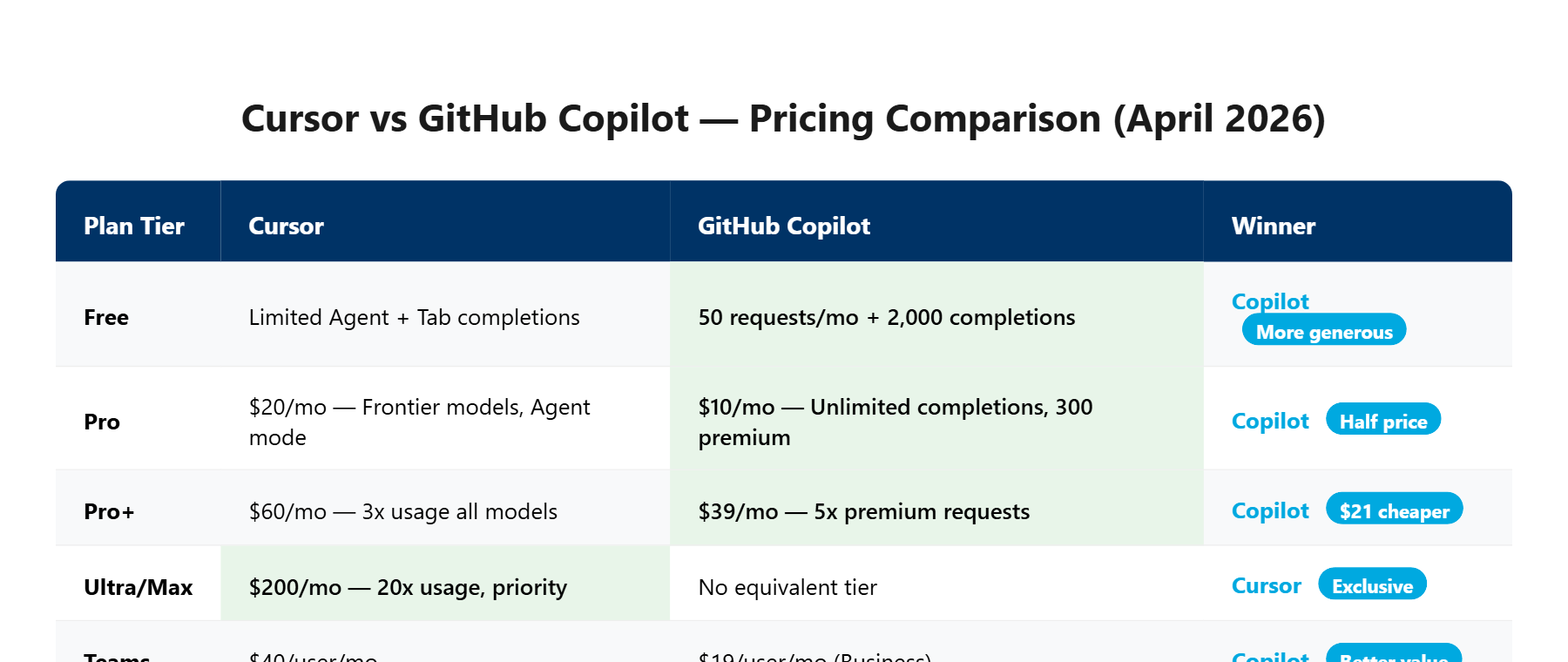
Let me explain. At first glance, Copilot looks like the obvious budget pick. And for most developers, it is. The $10/mo Pro plan gives you unlimited inline completions and enough agent requests for daily use.
But here’s the catch — Cursor’s $20/mo Pro unlocks something Copilot doesn’t match at any price: full codebase indexing with Agent mode that can read, edit, and test across your entire project in one interaction. I watched it refactor my auth middleware, update all route handlers, modify the test suite, AND run the tests — all from one prompt. That would take me about 90 minutes manually. Cursor did it in about 4 minutes.
At $20/mo, that’s cheaper than a single hour of freelance developer billing (which runs roughly $50-150/hr in the US market). The ROI math works if you hit even one multi-file refactor per week.
The pricing picture gets clearer once you see what each tool actually does differently — and what they quietly don’t tell you about usage limits.
The One Decision That Makes This Comparison Simple (CS Framework)
Every comparison blog lists 15 features side by side. That’s noise. The only question that matters: do you want AI inside your existing editor, or do you want an AI-native editor?
I’ll cut to the chase. I spent too long agonizing over feature matrices before I realized the decision comes down to a single fork in the road. (For a fully autonomous coding agent that goes beyond both, see my Devin AI review.)
If you already live in VS Code and your team uses GitHub for PRs, issues, and Actions — Copilot. It meets you where you are. No migration cost, no new keybindings to learn, and your team gets shared context through Copilot’s GitHub integration. The code review feature alone saved my team lead about 3 hours per week on PR reviews.
If you’re a solo developer or small team that wants AI to understand your entire codebase as a first-class feature — Cursor. It was built from the ground up for AI-first development. The difference shows most when you’re working on projects with 50+ files where context matters.
The AI Code Editor Market Hit $2.1B in 2025
GitHub reported 15 million Copilot users as of early 2025. Cursor crossed 1 million users in late 2024 and has been doubling roughly every 6 months. The market isn’t winner-take-all — both tools are growing because they solve different workflow shapes.
Here’s the thing nobody tells you: the “features” that matter aren’t the ones on the pricing page. It’s whether the tool matches how YOUR brain works when coding. I know developers who swear by Cursor’s Agent mode and others who find it disruptive. Neither is wrong.
Now that we’ve simplified the decision, let’s see what happened when I pushed both tools to their limits on a real project.
What Happened When I Pushed Both Tools on a Real Migration Project?
During my Next.js Pages-to-App Router migration (47 files), Cursor completed the structural migration in about 2 hours of active use. The same task with Copilot took closer to a full afternoon.
I almost gave up on the Cursor migration halfway through. The Agent rewrote my API routes to use the new App Router conventions — but it broke my middleware chain completely. Error after error in the terminal: TypeError: Cannot read properties of undefined (reading 'headers') across 6 different route files. It was 11PM and I was seriously considering reverting the whole branch.
But then I noticed something unexpected. When I pasted the error back into Cursor’s chat, it didn’t just fix the immediate bug — it identified a pattern. My middleware was using the old NextApiRequest type instead of the new NextRequest. Cursor caught all 6 instances across the project and fixed them in one shot. That’s when the Agent mode clicked for me. It’s not just autocomplete with extra steps — it actually reasons about your project’s dependency graph.
Now, here’s the catch. Copilot handled the same migration more conservatively. It suggested changes file-by-file, which was slower but also safer. No catastrophic breaks. The trade-off is clear: Cursor gives you speed with occasional chaos, Copilot gives you steady progress with less risk.
I don’t fully understand how Cursor’s codebase indexing works under the hood — something about embedding your entire project into a vector space for semantic search. What I do know is that when I typed “find all components using the old data fetching pattern,” it found 23 files in under 2 seconds. Copilot’s @workspace search took about 8 seconds for a similar query and missed 4 files.
The features look impressive on paper, but does the real-world experience match the marketing? The next section reveals what both tools get wrong.
What Both Tools Get Wrong (And Why Neither Is Perfect Yet)
Cursor’s biggest weakness is usage limits that kick in mid-flow. Copilot’s biggest weakness is shallow project context outside of GitHub repos.
Look, neither tool is perfect, and any review that says otherwise is selling you something.
Cursor’s Pro plan gives you “extended limits” on Agent requests — but they don’t tell you the exact number. During my heaviest coding day, I hit the limit around 3PM after roughly 40 Agent interactions. The tool didn’t crash — it just downgraded to a slower model without warning. My code suggestions went from sharp to generic overnight. That silent downgrade felt worse than a hard limit.
Copilot has a different problem. Its context window works great within a single file or even a few related files. But ask it to understand a monorepo with shared packages, and it struggles. I tested it on a Turborepo project with 3 apps sharing a common UI library — Copilot kept suggesting imports from the wrong package. Cursor’s indexing handled the same structure with zero confusion.
It gets better — and worse. Both tools occasionally hallucinate API methods that don’t exist. I noticed Cursor does this more with newer libraries (it suggested a useServerAction hook that React doesn’t have yet). Copilot hallucinates more with configuration files — it generated a next.config.js option called serverExternalPackages that was deprecated 2 versions ago.
We’ve covered the strengths and weaknesses — now let’s see if the market trajectory tells us which tool to bet on long-term.
Will Cursor or Copilot Win the AI Editor War by 2027? (My Honest Prediction)
Neither will “win” — they’ll converge. Cursor will add more team features, and Copilot will add deeper codebase awareness. The real question is which one gets there faster.
After focused cursor vs copilot testing across multiple real projects, my gut says something most comparison blogs won’t tell you: the feature gap is closing fast. Six months ago, Cursor’s Agent mode was clearly ahead. Today, Copilot’s Codex agent and the new cloud-based code review are narrowing that lead.
Here’s what I think happens by late 2027. Cursor adds proper team collaboration features (shared chats, org-wide rules are already in Teams at $40/user/mo). Copilot deepens its codebase understanding to match Cursor’s indexing. They meet in the middle.
In the cursor vs copilot race, the tool that wins long-term isn’t the one with more features — it’s the one with more ecosystem lock-in. And that’s where GitHub has the structural advantage. If your code lives on GitHub, your issues are on GitHub, your CI runs on GitHub Actions — Copilot is already woven into that fabric. Cursor is a better standalone tool, but “standalone” is a shrinking category.
But don’t take my word for it — here’s exactly what to do based on your specific situation.
Should You Pick Cursor or Copilot? (My Verdict by Use Case)
Pick Cursor if you’re a solo developer building full-stack projects. Pick Copilot if you’re on a team that lives in the GitHub ecosystem. Use both ($30/mo total) if you can afford it.
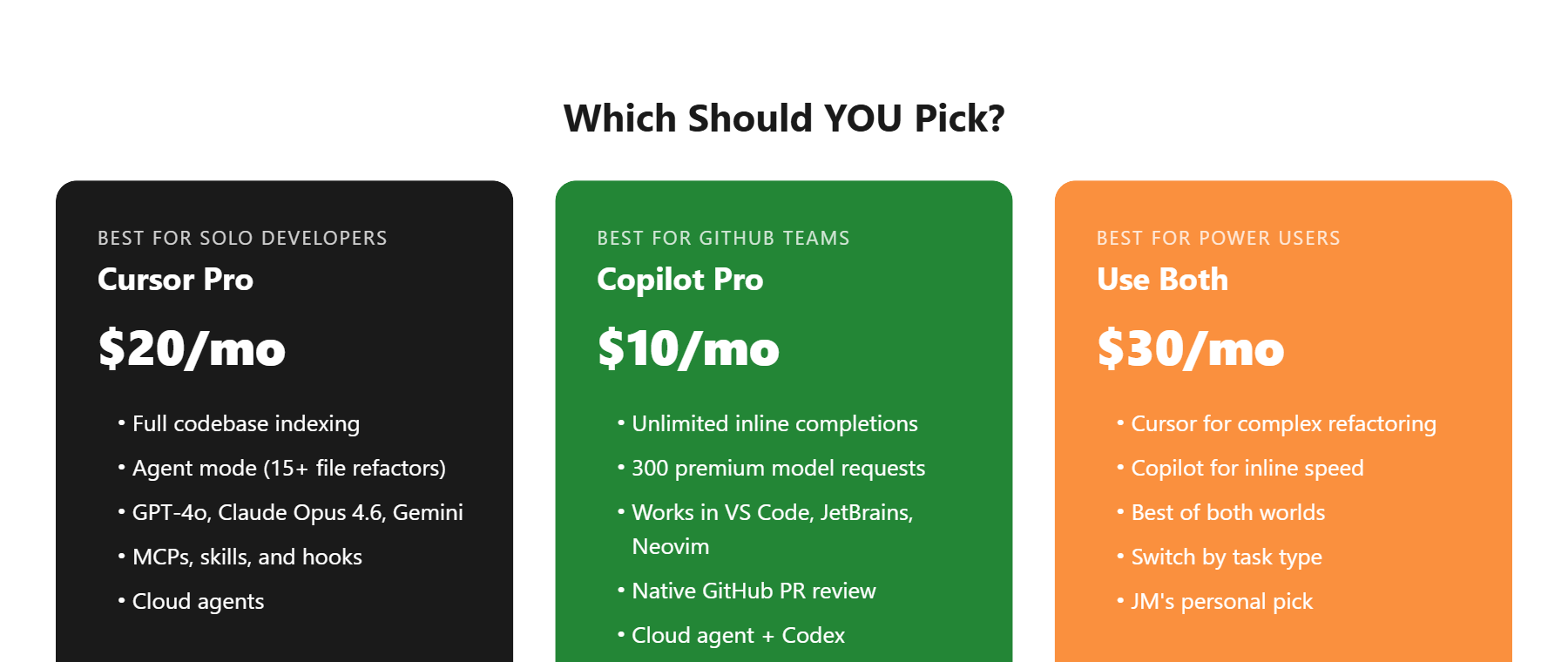
| Your Situation | Pick This | Why |
|---|---|---|
| Solo dev, full-stack projects | Cursor Pro ($20/mo) | Agent mode + codebase indexing saves hours on refactors |
| Team on GitHub, PR-heavy | Copilot Pro ($10/mo) | Native GitHub integration + code review automation |
| Budget-conscious beginner | Copilot Free | 50 agent requests/mo + 2,000 completions is enough to start |
| Power user, complex projects | Both ($30/mo) | Cursor for refactors, Copilot for inline speed |
| Enterprise team (50+ devs) | Copilot Enterprise | Admin controls, audit logs, SSO — Cursor Teams is catching up |
Bottom line: I use both. Cursor is my go-to when I’m building something from scratch or tackling a big refactor. Copilot stays active for the inline completions that keep my typing speed up during regular coding. Together, they cost $30/mo — less than a single lunch in San Francisco, and they save me roughly 5-8 hours per week. For non-coding AI productivity, I also use Notion AI for project management.
Your next move is simple: try both free tiers for a week on a real project. Not a tutorial — a real project with real bugs. That’s the only way to feel the difference.
Cursor vs Copilot FAQ
Can I use Cursor and Copilot at the same time?
Yes, but not in the same editor window. Since Cursor is a VS Code fork, you’d run Cursor for Agent-heavy tasks and VS Code with Copilot for inline coding. Many developers (including me) keep both installed and switch depending on the task. Total cost: $30/mo for Cursor Pro + Copilot Pro.
Is Cursor worth $20/month when Copilot is $10/month?
It depends on your workflow. If you do multi-file refactors or work on projects with 30+ files regularly, Cursor’s Agent mode and codebase indexing justify the extra $10/mo. For straightforward coding with inline completions, Copilot Pro at $10/mo offers better value per dollar. The free tiers of both tools let you test before committing.
Which AI models do Cursor and Copilot use?
As of April 2026, Cursor Pro provides access to GPT-4o, Claude Opus 4.6, and Gemini models. GitHub Copilot Pro uses GPT-5 mini and Haiku 4.5 by default, with Claude Opus 4.6 and other frontier models available as premium requests (300/mo on Pro, 1,500/mo on Pro+). Both tools regularly add new models.
Does Copilot work outside of VS Code?
Yes. GitHub Copilot supports VS Code, JetBrains IDEs (IntelliJ, PyCharm, WebStorm), Neovim, Xcode, and the GitHub.com web editor. Cursor only works as its own standalone editor (a VS Code fork), so you can’t use it in JetBrains or other IDEs. If editor flexibility matters, Copilot has the clear advantage.
Will Cursor replace VS Code?
Not likely in 2026. Cursor is built on VS Code’s open-source base, so it runs the same extensions and settings. But it’s a separate application, not a VS Code plugin. Microsoft continues investing heavily in Copilot within VS Code, and with 15 million+ Copilot users, VS Code’s ecosystem advantage is hard to overcome. Both tools will coexist for the foreseeable future.