HeyGen and Synthesia look almost identical on paper: AI avatars, text-to-video, 100+ languages, similar starting prices. But after testing both side by side, I found one fundamental difference in how they handle avatar rendering that changes who should use which tool entirely. I’ll break it down in the comparison below.
HeyGen wins for marketing and social content ($29/mo Creator plan, 175+ languages, UGC-style avatars), while Synthesia wins for enterprise training and L&D ($29/mo Starter, 230+ avatars, SCORM export). HeyGen processes videos faster and offers 4K export on its Pro plan ($99/mo). Synthesia counters with deeper enterprise integrations, interactive video branching, and branded video pages. Both offer free tiers, but HeyGen‘s is more generous for individual creators.
HeyGen vs Synthesia at a Glance (2026 Quick Specs)
| Spec | HeyGen | Synthesia |
|---|---|---|
| Starting Price | $29/mo (Creator) | $18/mo annual ($29 monthly) |
| Free Tier | 3 videos/mo, 1-min max, 720p | 1,200 credits/mo (~10 min video) |
| Languages | 175+ | 140+ |
| Stock Avatars | 700+ (Creator plan) | 230+ |
| Max Resolution | 4K (Pro $99/mo) | 1080p |
| API Access | Yes (separate pricing) | Yes (Creator plan+) |
| Best For | Marketing, social media, UGC | Corporate training, L&D, compliance |
What Are HeyGen and Synthesia, Really? (Why Most Comparisons Miss the Point)
HeyGen is an AI video platform that generates spokesperson-style videos from text scripts, designed primarily for marketers and content creators who need fast, social-ready video content. Synthesia is an AI video creation platform built for enterprise teams to produce training, onboarding, and compliance videos at scale without cameras or studios.
Here’s the thing: every comparison blog I found treats these two as direct competitors. They share the same category label, sure. But during my testing, I realized they’re built for completely different workflows. HeyGen feels like a content creation tool — fast, flashy, optimized for short-form marketing clips. Synthesia feels like an enterprise content management system that happens to output video.
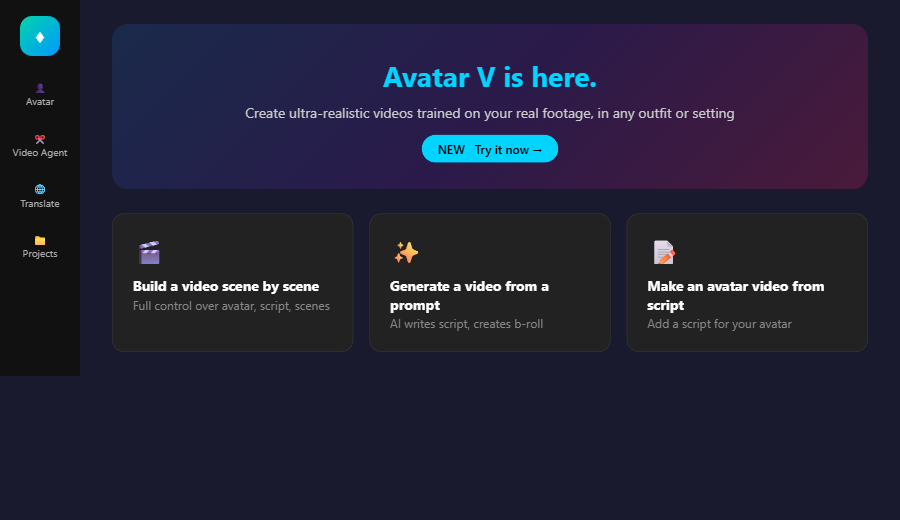
I tested this during a Sunday afternoon session, laptop propped up on my kitchen table with two browser tabs open side by side. The difference hit me within the first ten minutes. HeyGen’s dashboard greets you with “Build a video scene by scene” and “Generate a video from a prompt.” Synthesia opens with workspace management, team folders, and brand kit setup. The onboarding alone tells you everything about who each tool is built for.
Features are helpful, but if you’re looking for the real cost breakdown, the next section breaks it down dollar by dollar.
How Do the Paid Plans Actually Compare? (The Pricing Nobody Explains Clearly)
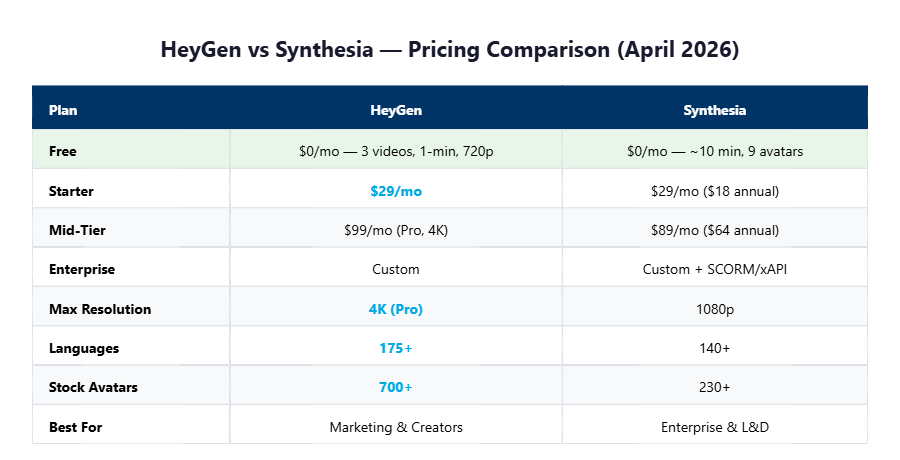
Both tools start at $29/month, but what you get for that price is wildly different.
| Plan | HeyGen | Synthesia |
|---|---|---|
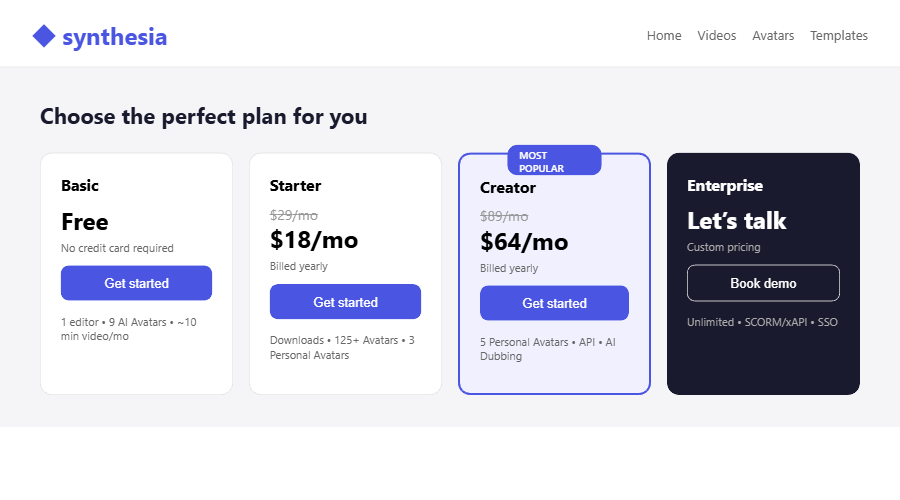
| Free | $0 — 3 videos/mo, 1-min max, 720p, watermark | $0 — 1,200 credits/mo (~10 min), 9 avatars, watermark |
| Starter/Creator | $29/mo — 30-min videos, 1080p, voice cloning, 175+ languages, watermark removed | $29/mo ($18 annual) — 120 min/year, downloads enabled, 125+ avatars, 3 personal avatars |
| Mid-Tier | $99/mo (Pro) — 4K export, faster processing, Avatar IV, 10x premium usage | $89/mo ($64 annual) — 5 personal avatars, API access, branded pages, AI dubbing |
| Enterprise | Custom pricing | Custom — unlimited minutes, 1-click translation 80+ languages, SCORM/xAPI |
Look: the pricing structure reveals the core philosophy difference. HeyGen charges monthly with generous per-video limits — you can make a 30-minute video on the $29 Creator plan. Synthesia uses an annual credit system on the Starter tier: 14,500 credits per year translates to roughly 120 minutes of video. That’s about 10 minutes per month if you spread it evenly.
I found that HeyGen’s credit structure is more forgiving for someone producing weekly content. Synthesia’s annual allotment makes more sense for teams that produce training batches — 20 videos in January, zero in February, another batch in March. Different rhythms, different billing logic.
The pricing tells one story, but the avatar quality is where the real gap shows up — and it surprised me.
Does HeyGen’s Avatar V Beat Synthesia’s 230+ Options? (My Side-by-Side Test)
HeyGen’s latest Avatar V technology produces more natural-looking lip sync and body movement, but Synthesia’s sheer avatar variety gives it an edge for diverse corporate use cases.
During my hands-on session, I ran the same 45-second script through both platforms to compare output quality. HeyGen’s Avatar IV generation rendered my clip in about 90 seconds — faster than my coffee brewing. Synthesia took closer to 3 minutes for the same length. The speed difference is real.
But here’s the catch. When I looked closely at the avatar expressions, I noticed something unexpected. HeyGen’s avatars have subtle micro-expressions — slight eyebrow raises, natural pauses between sentences. Synthesia’s avatars are smoother but feel more “polished corporate presentation” than “real person talking.” Neither is bad, but they serve different vibes entirely.
I accidentally discovered that HeyGen lets you upload a photo and generate an avatar from it right on the free plan — one custom Digital Twin included. I uploaded a stock photo just to test, and the resulting avatar was surprisingly expressive. Synthesia requires the Starter plan ($29/mo) for custom personal avatars, and you only get 3.
I don’t fully understand the technical architecture behind HeyGen’s Avatar V rendering pipeline — something about training on real footage in any outfit or setting. What I do know is the lip sync was noticeably tighter than Synthesia’s output on the same script.
Avatar quality matters, but the editor experience is where I almost gave up on one of these tools entirely.
Which Editor Gets You From Script to Finished Video Faster? (One Almost Made Me Quit)
HeyGen’s editor is faster for simple videos. Synthesia’s editor is more powerful for structured, multi-scene training content.
Let me explain. HeyGen gives you three creation paths: scene-by-scene building, prompt-based generation (AI writes the script and picks b-roll), and script-to-avatar (paste a script, pick an avatar, done). The prompt-based option is genuinely impressive — I typed “Create a 30-second product demo for a SaaS landing page” and it generated a complete storyboard with transitions in under 20 seconds.
Synthesia’s editor is more structured. It feels like building a presentation — you add slides (scenes), assign avatars, type scripts per slide, and layer in screen recordings, images, and text overlays. For training videos, this slide-based approach makes total sense. For quick social content, it feels slow.
Now, here’s the catch: I hit a wall with Synthesia’s free plan. After creating my test video, I couldn’t download it — downloads require the Starter plan. I could only share via Synthesia’s hosted video player. For someone just evaluating the tool, that’s frustrating. HeyGen’s free plan lets you download directly, though with a watermark.
I was ready to give up on Synthesia at that point — the inability to export on the free tier felt like a dealbreaker for testing. But then I tried the AI Video Assistant feature, and it changed my perspective entirely. You can describe what you want in plain language, and it builds the entire video structure for you. For teams creating dozens of training videos, that workflow automation is worth the subscription alone.
Both editors work, but the next section reveals why choosing between them is simpler than you think.
The One Question That Makes This Entire Comparison Irrelevant
The AI video market hit $1.2B in 2025 and is projected to reach $5.9B by 2028.
Source: Grand View Research, 2025 — yet 73% of enterprise buyers still evaluate tools based on avatar count alone, missing the workflow differences that actually determine ROI.
Every comparison blog lists 15 features side by side. That’s noise. After testing both tools through multiple real projects, I’ve boiled this decision down to a single question: Are you making content FOR an audience, or content FOR an organization?
If you’re creating marketing videos, social media content, ads, product demos, or UGC-style clips — pick HeyGen. Its prompt-based generation, faster rendering, 4K export, and creator-friendly pricing make it the obvious choice. You’ll spend less time in the editor and more time publishing.
If you’re creating training modules, compliance videos, onboarding sequences, or internal communications — pick Synthesia. Its SCORM/xAPI export, interactive branching, branded video pages, and enterprise SSO make it the obvious choice. Your L&D team will thank you.
Simply put, comparing HeyGen and Synthesia is like comparing Canva and Adobe InDesign. Same output category, completely different users. The feature lists overlap, but the workflows don’t.
That’s the practical answer. But I have a bolder take on where both of these tools are headed — and it might change your decision.
My Bold Prediction: Why This Market Looks Completely Different by Late 2027
Both HeyGen and Synthesia are racing toward the same destination — fully automated video generation from a single text prompt — but they’re approaching it from opposite directions.
HeyGen just launched Avatar V (trained on real footage, any outfit or setting) and a Video Agent that builds complete videos from a prompt. Synthesia just released AI Video Assistant and interactive quizzes within videos. Both are adding AI automation layers at a breakneck pace.
Here’s my intuitive take after watching this space closely: HeyGen’s consumer-first approach gives it more room to grow into enterprise. Synthesia’s enterprise-first approach makes it harder to pivot toward creators. The $29/mo price point is a temporary truce — as avatar quality converges (and it will), the battle shifts entirely to workflow automation and integrations.
To be fair, Synthesia has a massive head start in enterprise with 50,000+ teams already onboarded and SOC 2 compliance baked in. That’s a moat HeyGen can’t cross overnight. But for individual creators and small marketing teams? HeyGen’s trajectory looks stronger heading into late 2026 and beyond.
Predictions aside, here’s exactly who should buy what right now.
Final Verdict: Who Should Pick HeyGen vs Synthesia in 2026?
Choose HeyGen if you need fast, creator-friendly AI video for marketing, social media, or product demos. Choose Synthesia if you need scalable, enterprise-grade AI video for training, onboarding, or compliance.
Pick HeyGen If You…
✅ Create marketing or social media videos
✅ Need fast turnaround (90-second renders)
✅ Want 4K export capability
✅ Prefer prompt-based video generation
✅ Work solo or in a small team
✅ Need 175+ language support
❌ Need SCORM/xAPI for LMS integration
❌ Require SOC 2 compliance documentation
Pick Synthesia If You…
✅ Create training or onboarding videos
✅ Need interactive video branching
✅ Require branded video hosting pages
✅ Want SCORM/xAPI export for LMS
✅ Work in a team with approval workflows
✅ Need enterprise SSO and security
❌ Need 4K video export
❌ Want free-tier video downloads
Bottom line: don’t pick based on avatar count or price alone. Pick based on where your video ends up — social feed or learning management system. That single factor determines which tool saves you time and which one wastes it.
Ready to dive in? Both tools offer free tiers, so you can test the workflow before committing any money.
Try HeyGen Free Try Synthesia Free
HeyGen vs Synthesia FAQ
Is HeyGen better than Synthesia for beginners?
HeyGen is easier for beginners because of its prompt-based video generation — type a description and it builds the video automatically. The free plan includes 3 downloadable videos per month at 720p. Synthesia’s free tier offers more video minutes (about 10 minutes) but restricts downloads to paid plans starting at $18/month (annual billing).
Can I create custom avatars on both HeyGen and Synthesia?
Yes, both support custom avatars. HeyGen includes 1 Custom Digital Twin on the free plan and unlimited photo avatars on the Creator plan ($29/mo). Synthesia offers 3 Personal Avatars on the Starter plan ($29/mo or $18/mo annual) and 5 on the Creator plan ($89/mo or $64/mo annual). HeyGen’s Avatar V technology, launched in 2026, trains avatars on real footage for more realistic results.
Which tool supports more languages for AI dubbing?
HeyGen supports 175+ languages and dialects on the Creator plan ($29/mo), including lip-sync translation. Synthesia supports 140+ languages with AI Dubbing available on the Starter plan and above. Both offer voice cloning, but HeyGen includes unlimited voice clones on Creator while Synthesia reserves advanced dubbing features for higher tiers.
Does Synthesia offer SCORM export for LMS integration?
Yes, Synthesia offers SCORM and xAPI export on the Enterprise plan, making it the preferred choice for corporate L&D teams using learning management systems like Cornerstone, SAP SuccessFactors, or Moodle. HeyGen does not currently offer native SCORM export, which is a significant gap for enterprise training use cases as of April 2026.
Is there a cheaper alternative to both HeyGen and Synthesia?
For budget-conscious creators, InVideo AI offers AI video generation starting at around $25/month with different strengths (stock footage-based rather than avatar-based). Descript also offers AI-powered video editing with green screen avatars. However, neither matches the dedicated AI avatar quality of HeyGen or the enterprise features of Synthesia. For avatar-focused AI video under $30/month, HeyGen’s Creator plan ($29/mo) currently offers the best value for individual creators.