If you’re searching for an honest invideo review, you’re in the right place. Last Tuesday, I typed a single sentence into InVideo AI and walked away to grab coffee. By the time I got back, I had a fully edited, narrated, subtitled video sitting in my dashboard. No timeline. No cuts. No stock footage hunting. One prompt, one video.
It sounds impossible that a text prompt could replace a video editor, but the invideo review workflow I’m about to walk you through — and the hidden credit math behind it — tell a very different story.
InVideo AI is a prompt-based video creation platform that turns text descriptions into fully edited videos using 200+ AI models including Veo 3.1, Sora 2 Pro, and Kling 3.0. Starting at $17/month (Plus plan) with a limited free tier offering 5 credits and 4 watermarked exports, it handles scripts, voiceover, stock footage, and editing in one pipeline. Here’s my honest invideo review after putting it through focused, real-world testing.
InVideo AI at a Glance: Is It Worth Your Time?
| Category | Verdict |
|---|---|
| Best For | Faceless YouTube, social media ads, UGC content |
| Biggest Strength | 200+ AI models (Sora 2, VEO 3.1, Kling 3.0) in one platform |
| Biggest Weakness | Premium models burn credits fast — budget carefully |
| Free Tier | 5 credits, 4 watermarked exports, 10 GB storage |
| Starting Price | $17/month (Plus) or $200/year |
| Would I Recommend It? | Yes — if you stick to mid-tier models and use Agent mode |
Quick Specs
| Spec | Value |
|---|---|
| Price | Free (5 credits) / $17–$900/mo |
| Free Tier | 5 credits, 4 exports with watermark, 10 GB |
| AI Models | 200+ (Veo 3.1, Sora 2 Pro, Kling 3.0, Seedance 2.0) |
| Max Video Length | 30 minutes (v4 agent, single prompt) |
| Platforms | Web browser only (no desktop app) |
| Stock Library | iStock, Storyblocks (paid plans only) |
| Best For | Faceless YouTube, social ads, product videos |
I’ll cut to the chase: InVideo AI is one of those tools that looks too good to be true on the landing page. And after testing it, I found that it’s genuinely impressive — but the credit system has some sharp edges that most reviews gloss over. Let me walk you through what actually happened.
How Does the One-Prompt Video Workflow Actually Work?
InVideo AI’s core promise is simple: type what you want, and the AI builds the entire video — script, visuals, voiceover, music, and subtitles. Sunday afternoon, my second monitor still showing the InVideo dashboard, I decided to put this promise through a real stress test for this invideo review.
Here’s the exact prompt I used: “Create a 2-minute explainer video about the benefits of AI coding tools for freelance developers. Use a professional male voiceover, modern B-roll footage, and include text overlays for key statistics.”
The v4 agent picked it up and started making decisions — script structure, scene pacing, footage selection, voiceover tone. InVideo claims the agent makes over 500 creative decisions per video, and watching it work, I believe it. The first draft landed in about 45 seconds using Nano Banana Pro, which is faster than my coffee machine takes to heat up.
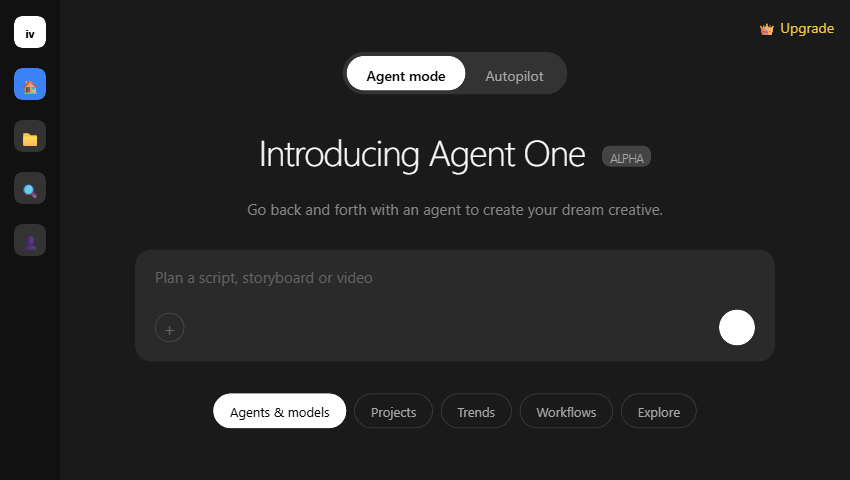
Here’s the thing — the output quality depends heavily on which model you choose. My first test with Nano Banana Pro looked like a decent stock footage slideshow. When I switched to Seedance 2.0 for the same prompt, the visual quality jumped noticeably. The footage had more cinematic movement and the scene transitions felt intentional rather than random.
But the real surprise came from the two workflow modes. Agent Mode lets you go back and forth — “change the voiceover to female,” “make the intro punchier,” “swap the third scene for something with more energy.” Autopilot just runs with your initial prompt and delivers a final cut. In my invideo review testing, Agent Mode produced consistently better results because you can steer the AI mid-process, but it burns more credits per session since each revision costs additional compute.
If you’ve used HeyGen for avatar-based videos, InVideo AI feels like the opposite approach. HeyGen gives you a talking head. InVideo gives you a full production — B-roll, transitions, music, the works — but without a human face unless you specifically add an AI avatar. Different tools for different jobs.
What Models Does InVideo AI Actually Include? (This Is Where It Gets Interesting)
All paid plans give you access to 200+ generative models, including Sora 2 Pro, VEO 3.1, Kling 3.0, Seedance 2.0, and ElevenLabs music. Before starting this invideo review, I used to think InVideo was just another video template tool. It turns out the platform quietly evolved into something much more interesting.
Think about it: accessing Sora 2 directly through ChatGPT Pro costs $200/month with heavy usage limits. VEO 3.1 through Google’s Vertex AI runs close to $250/month standalone. InVideo bundles both — plus Kling 3.0, Seedance 2.0, Nano Banana Pro, and dozens more — starting at $17/month.
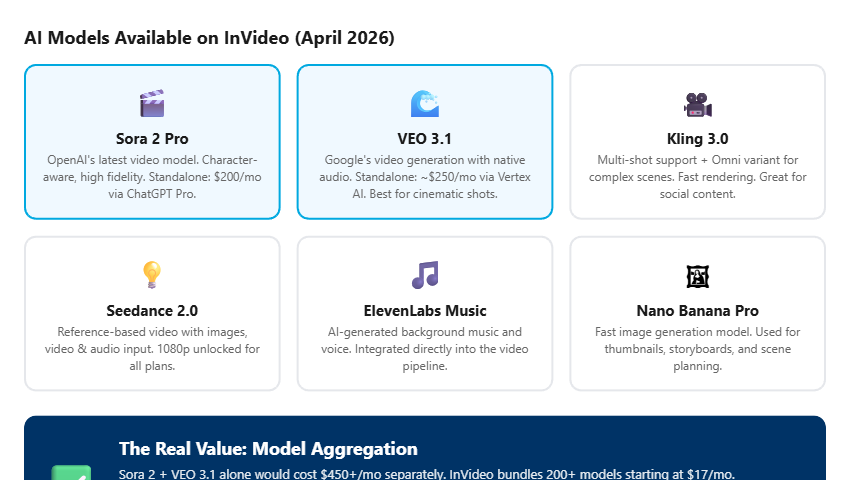
I don’t fully understand how Seedance 2.0’s reference-based generation actually works at the model level — something about conditioning on input images and audio simultaneously. What I do know from testing is that it produced the most visually consistent results when I fed it a reference image of the style I wanted. The output matched the mood and color palette almost perfectly.
The practical implication? InVideo AI isn’t really competing with Premiere Pro or CapCut. It’s competing with the AI model providers themselves. The video editor is the interface — the real product is aggregated model access at a fraction of the standalone cost.
The Credit Trap That Most InVideo Reviews Skip Over
The $17/month price tag is real, but the credit system behind it determines your actual cost — and it varies wildly depending on which models you use. Now, here’s the catch:
On the free tier, I burned through all 5 credits in under 10 minutes. Two test videos with Seedance 2.0, and I was done. That’s the moment I almost closed the tab for good — 5 credits felt like a tease rather than a trial. What kept me going was curiosity about whether the Plus plan’s 75 credits would actually stretch for a month of real use.
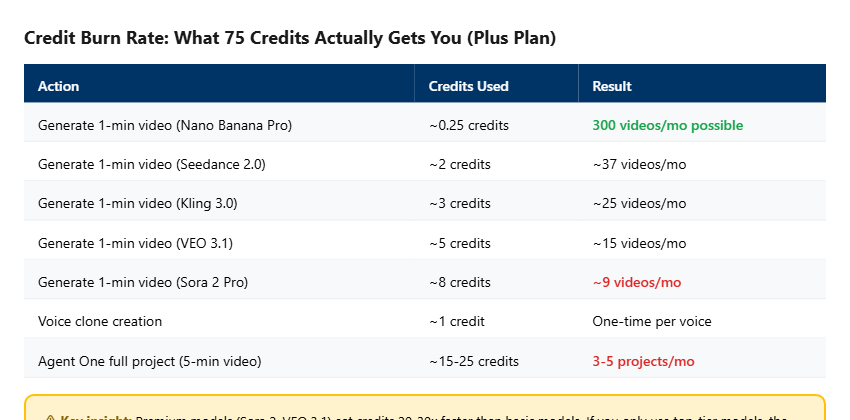
The math is straightforward but brutal. With 75 credits on the Plus plan, you can generate roughly 300 one-minute videos using Nano Banana Pro. But switch to Sora 2 Pro, and that same 75 credits gets you about 9 videos. Nine. For a whole month.
The Real Cost Per Video
At Plus pricing ($17/mo, 75 credits): Nano Banana Pro videos cost ~$0.06 each. Sora 2 Pro videos cost ~$1.89 each. That’s a 30x price difference depending on model selection. Most users don’t realize this until they’ve already burned through their monthly credits in the first week.
I found that the sweet spot is Kling 3.0 — good enough visual quality for most social content, and at ~3 credits per minute, you get about 25 videos per month on the Plus plan. That’s roughly $0.68 per video. Reasonable. But if you need cinematic quality (VEO 3.1 or Sora 2), you’re looking at the Max plan ($85/mo) at minimum.
Is InVideo AI’s $17/Month Plan Actually Worth It?
Yes — but only if you understand the credit economics and pick your models strategically. Let me explain:
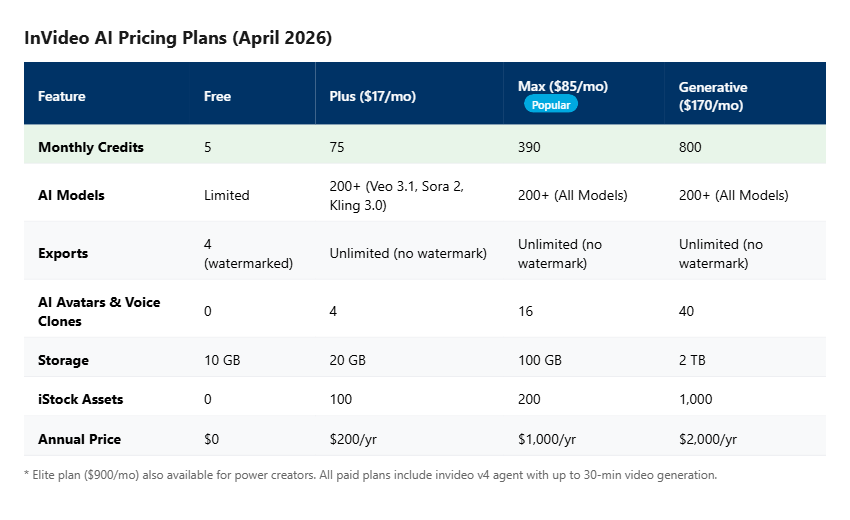
The Plus plan ($17/month) works for creators making 15-25 social videos per month using mid-tier models like Kling 3.0 or Seedance 2.0 Fast. If you’re building a faceless YouTube channel with 2-3 videos per week, this tier handles it comfortably as long as you’re not chasing Sora 2-quality visuals for every upload.
The Max plan ($85/month) is where it gets interesting. At 390 credits, you can afford to use premium models for hero content while using faster models for day-to-day social clips. It also jumps from 4 to 16 AI avatars and voice clones — actually useful if you’re running multiple brand channels. When I compare this to hiring a freelance video editor ($300-500 per video) or even using tools like Gamma AI for presentations, the per-video economics are compelling.
Bottom line: the annual billing saves 15% on Plus/Max/Generative plans (10% on Elite). If you’re going to commit, pay yearly. The Plus annual is $200 — about $16.67/month — and that’s cheaper than a single stock footage subscription.
My InVideo Review: What I Don’t Like (Honest Cons)
No invideo review would be complete without covering the downsides. InVideo AI has genuine rough edges that showed up during my testing. Look:
Agent One is still in Alpha, and it shows. During one session, I tried uploading a custom audio clip to use as background music, and the agent threw a vague “processing error” with no clear explanation. I had to convert the file from AAC to MP3, then re-upload — something the docs don’t mention. It works, but the error handling needs work.
✅ Pros
- 200+ AI models in one platform (Sora 2, VEO 3.1, Kling 3.0)
- v4 agent handles full pipeline from prompt to export
- Agent Mode allows iterative refinement mid-project
- 30 minutes of video from a single prompt
- Model aggregation saves hundreds vs standalone subscriptions
❌ Cons
- Free tier (5 credits) is barely enough to evaluate the tool
- Premium models burn credits extremely fast
- Agent One (Alpha) has rough error handling
- No desktop app — browser-only
- Voice cloning requires paid plan (no free trial for it)
I was initially frustrated about the credit drain, especially coming from tools where you pay a flat rate for unlimited use. But to be fair, InVideo is providing access to models that cost $200-250/month each at retail pricing. The credit system is the price of aggregation. Whether that tradeoff works for you depends on how many videos you need and which models you actually use.
One more thing I accidentally discovered: if you paste a URL into the Agent One prompt instead of writing a description, it’ll scrape the page content and use it as source material for the video. I tested this with one of my blog posts about Ideogram, and it generated a surprisingly coherent video summary. Not perfect, but a genuinely useful shortcut for content repurposing that I haven’t seen mentioned in other invideo review articles.
My Final InVideo Review Verdict: Who Should Actually Use It?
InVideo AI is the best option in 2026 for creators who need video content at scale without learning traditional editing. Here’s exactly what to do next:
If you’re running a faceless YouTube channel, producing social ads, or need product videos on a budget — InVideo AI is worth trying. The free tier gives you 5 credits, enough for 2-3 test videos to see if the output quality matches your standards. Start with Kling 3.0 or Seedance 2.0 Fast for the best quality-to-credit ratio.
If you need talking-head videos with realistic AI avatars, HeyGen is still the better fit. If you need a full video editing suite for manual post-production, look at Descript or CapCut. Based on this invideo review, InVideo AI shines when you want to skip the editing entirely and go from idea to finished video in minutes.
Remember the credit math from earlier? That hidden cost structure is the answer to the open loop I started with. The text prompt absolutely can replace a video editor — but the credit bill at the end determines whether that replacement is $0.06 per video or $1.89. Choose your models wisely, and InVideo AI is one of the most cost-effective video tools available right now.
InVideo Review FAQ
Is InVideo AI free to use?
InVideo AI offers a free tier with 5 credits per month, 4 watermarked video exports, and 10 GB of storage. This is enough for 2-3 test videos using mid-tier models like Kling 3.0. Paid plans start at $17/month (Plus) with 75 credits and watermark-free exports. All paid plans include access to 200+ AI models including Sora 2 Pro and VEO 3.1.
What AI models does InVideo AI support?
As of April 2026, InVideo AI supports 200+ generative models including OpenAI’s Sora 2 Pro (character-aware video), Google’s VEO 3.1 (cinematic generation with audio), Kling 3.0 and Kling 3.0 Omni (multi-shot video), Seedance 2.0 (reference-based generation at 1080p), Nano Banana Pro (fast image/video), and ElevenLabs for AI music and voice generation.
How long of a video can InVideo AI create?
InVideo AI’s v4 agent can generate up to 30 minutes of video from a single prompt — a significant upgrade from earlier versions that capped at a few minutes. The agent handles script writing, scene selection, B-roll matching, voiceover, music, and pacing automatically. Longer videos consume more credits, with costs varying by model (e.g., ~0.25 credits per minute for Nano Banana Pro vs ~8 credits per minute for Sora 2 Pro).
Is InVideo AI better than HeyGen?
InVideo AI and HeyGen serve different use cases. InVideo AI excels at full-production videos from text prompts — B-roll, transitions, music, narration — without needing a human presenter. HeyGen specializes in AI avatar talking-head videos with realistic lip sync. Choose InVideo for faceless content, social ads, and explainers. Choose HeyGen if you need a virtual presenter or spokesperson for training, marketing, or sales videos.
What is InVideo AI Agent One?
Agent One is InVideo AI’s conversational video creation agent, currently in Alpha as of April 2026. It supports two modes: Agent Mode (interactive, allows back-and-forth refinement of scripts, storyboards, and videos) and Autopilot (fully automated, generates final video from a single prompt). Agent One features project memory for maintaining character and style consistency across multiple videos in a series.