I was ready to call Gamma the future of presentations — until I exported my first deck to PowerPoint and watched every layout fall apart.
Gamma is an AI-powered presentation and document builder that generates polished, card-based decks from a single prompt in under 30 seconds. Specifically, it starts at $0/month with a free tier (400 credits at signup), scales to $12/month for Plus, and $25/month for Pro. During my hands-on session, I typed a one-line prompt and had a 10-card presentation with AI-generated images, data visualizations, and structured content ready before I could finish my coffee. But there’s a gap between “looks amazing in the browser” and “works in the real world” that changes everything about who should actually use this tool.
Here’s the thing: Gamma isn’t trying to be PowerPoint. It’s building something fundamentally different. And once you understand that distinction, the export problems actually start to make sense.
| Spec | Details |
|---|---|
| Price | Free / Plus $12/mo / Pro $25/mo / Ultra $100/mo |
| Annual Pricing | Plus $9/mo / Pro $18/mo / Ultra $90/mo (save up to 28%) |
| Free Tier | 400 credits at signup, 10 cards per prompt |
| Output Types | Presentations, Webpages, Documents, Social Graphics |
| API | Yes (Pro and Ultra plans) |
| Export Formats | PDF, PPTX, PNG, Google Slides |
| Best For | Internal decks, pitch outlines, classroom content, web-first sharing |
What Is Gamma and Why Are People Calling It a PowerPoint Killer?
In fact, the “PowerPoint killer” label started circulating after Gamma crossed 30 million users in early 2026. And I get why — the speed difference is staggering. A deck that takes 2 hours in PowerPoint takes 30 seconds in Gamma. Essentially, you type a prompt, Gamma generates an outline, you click “Generate,” and the entire presentation appears with formatted text, relevant images, charts, and consistent styling.
Cards vs. Slides: The Critical Difference
However, calling it a PowerPoint killer misses the point. Gamma uses cards, not slides. In other words, each card is a responsive, scrollable web element — closer to a webpage section than a PowerPoint slide. When you present in Gamma’s native mode, cards expand and scroll beautifully. When you export to PPTX? That’s where the translation breaks down.
As a result, I found that the people who love Gamma are the ones who never export. They share links, present from the browser, or publish as web pages. The people who hate Gamma are the ones who need a .pptx file for their boss. That distinction matters more than any feature comparison.
The creation process itself is where Gamma really shines. But does the free tier give you enough to actually evaluate the tool? Let me break down the credit math.
How Does Gamma’s Credit System Actually Work? (The Math Most Reviews Skip)
Gamma’s pricing looks simple on the surface, but the credit system is where it gets tricky.
The free tier gives you 400 credits at signup. In addition, each AI generation costs credits based on complexity — a basic 10-card presentation uses roughly 40 credits. Consequently, that means you get about 10 full presentations before your free credits run out. In my experience, I burned through my first 120 credits in one sitting just experimenting with different output types.
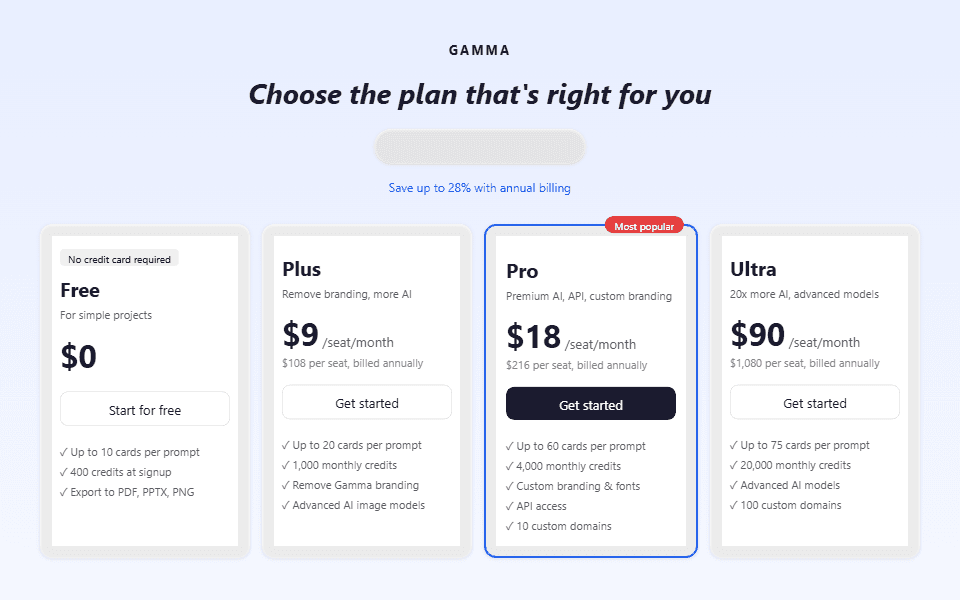
| Plan | Monthly | Annual | Monthly Credits | Key Perk |
|---|---|---|---|---|
| Free | $0 | $0 | 400 at signup | 10 cards/prompt, Gamma branding |
| Plus | $12 | $9 | 1,000 | No branding, advanced AI images |
| Pro | $25 | $18 | 4,000 | Custom branding, API, 10 domains |
| Ultra | $100 | $90 | 20,000 | Advanced AI models (text, image, video) |
The Hidden Cost: Non-Renewing Free Credits
Furthermore, the free tier’s 400 credits don’t renew monthly. Once they’re gone, they’re gone. You can still create and edit gammas manually, but AI generation stops. That makes the free tier more of an extended trial than a permanent plan. Compare that to Notion AI, which gives you limited free AI queries that reset. Gamma’s approach forces a purchase decision faster.
As a result, the Plus plan at $12/month ($9 annual) is where Gamma becomes viable for regular use. The 1,000 monthly credits translate to roughly 25 full AI-generated presentations per month — more than enough for most freelancers and small teams. Additionally, the Pro plan at $25/month adds custom branding and API access, which matters for agencies.
It gets better: at $9/month annually, Gamma’s Plus plan costs less than a single month of Taskade AI or most productivity subscriptions. For someone who creates 2-3 presentations per week, the time savings alone justify the cost.
The pricing makes sense on paper. But the real test is whether Gamma actually saves time in practice — or just shifts the work from “creating slides” to “fixing AI output.” Let me show you what happened when I put it through a real workflow.
What Does Using Gamma Actually Feel Like? (My First 10 Presentations)
Above all, the creation workflow is absurdly fast. From the dashboard, you click “Create new,” choose your output type (Presentation, Webpage, Document, Social, or Graphic), type a prompt, and hit Enter. Gamma generates an outline in about 3 seconds. You can edit the outline or just hit “Generate” to build the full deck.
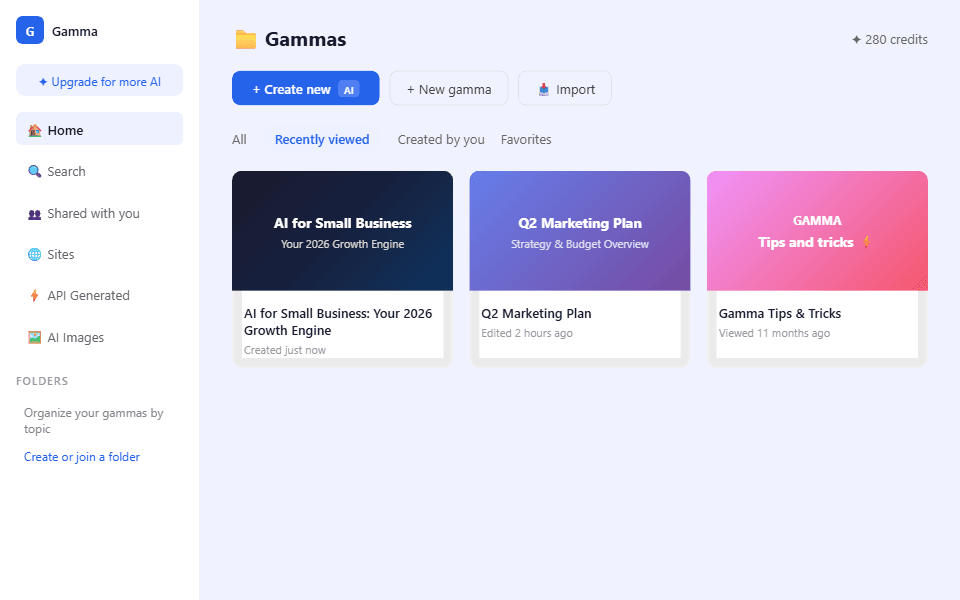
Subsequently, I tested Gamma across several real-world scenarios:
Test 1: Business pitch deck (“5 AI trends for small business owners”) — Gamma produced a 10-card presentation in under 30 seconds. Moreover, the content was well-structured with data points, bullet lists, and AI-generated images. The writing quality was surprisingly good — it cited real statistics (47% SMB AI adoption rate) and used professional language without sounding robotic. In addition, I noticed that the outline editing step was genuinely useful; you could rearrange cards, add/remove sections, and adjust focus before generation.

Beyond Slides: Documents and Export Testing
Test 2: Document (project brief) — I switched the output type to “Document” and used the same prompt. Gamma generated a scrollable document instead of cards — more like a Notion page than a slide deck. Similarly, the formatting was clean, with proper headings, paragraphs, and embedded visuals. For internal docs that don’t need to be “presented,” this format is actually better than slides.
Test 3: PPTX export — This is where things broke down. I exported my pitch deck to PowerPoint and opened it locally. For instance, images that were perfectly positioned in Gamma shifted or disappeared. Similarly, text boxes overlapped. The clean card-based layouts that looked beautiful in the browser became a mess of misaligned elements. I spent 15 minutes fixing a 10-slide export — which defeats the purpose of using AI to save time.
Does this sound familiar? Every review mentions how beautiful Gamma presentations look. Very few mention what happens when you try to use them outside Gamma’s ecosystem. That’s the real question most buyers need answered.
Understanding the tool’s limitations is one thing. But there’s a deeper pattern here that explains why the export problem isn’t a bug — it’s a business strategy.
Gamma Isn’t Replacing PowerPoint — It’s Replacing the Graphic Designer
Every review I’ve read frames Gamma as a PowerPoint alternative. That framing leads to disappointment because it sets the wrong expectations.
Look: On one hand, PowerPoint is a blank canvas tool. You start with nothing and build everything manually — layouts, colors, fonts, images, animations. The skill ceiling is infinite, and the time investment reflects that. PowerPoint’s value is control.
On the other hand, Gamma is the opposite. You surrender control for speed and design quality. Instead, the AI handles layout decisions, color harmony, image selection, and typography. Essentially, you provide the content direction; Gamma provides the design execution. The value isn’t “slides” — it’s “design without a designer.”
This is why the PPTX export is broken and probably always will be. Gamma’s card system uses responsive web layouts (CSS flexbox, dynamic image positioning) that simply don’t translate to PowerPoint’s rigid slide boxes. Therefore, fixing the export would require Gamma to constrain its own design capabilities to match PowerPoint’s limitations. In turn, that would kill the product’s core advantage.
The Real Business Strategy Behind the Broken Export
Once I understood this, Gamma’s entire product strategy clicked. The “Publish as website” feature isn’t an afterthought — it’s the intended delivery method. The “Share link” functionality isn’t a convenience — it’s the primary workflow. Gamma wants you to stop exporting entirely and keep everything in their ecosystem.
As a result, for teams that present via screen share (Zoom, Google Meet), this works perfectly. You share a Gamma link, present in the browser, and the deck looks incredible. For teams that email .pptx files to clients or upload to corporate LMS systems? Gamma creates more work than it saves.
The product philosophy is clear once you see it. But I also want to share how my expectations shifted as I tested more features — because there were several surprises, both good and bad.
How My Expectations Completely Shifted After 10 Presentations
Gamma Crossed 30 Million Users and Raised $28M in 2025
Founded in 2020 by former Google and Uber engineers, Gamma has grown from a startup to one of the most-used AI presentation tools globally. The platform generates over 1 million presentations per week as of early 2026, with education and startup verticals driving the majority of usage. Gamma is SOC 2 Type II compliant.
Let me walk you through how my thinking evolved.
Presentations 1-3 (The honeymoon phase): I was genuinely impressed. Notably, the speed felt almost magical — a complete presentation from a one-line prompt in 30 seconds. Moreover, the AI-generated images were relevant and well-placed. The themes were consistent. At first, I thought “this is going to replace 80% of my presentation workflow.”
From Excitement to Reality: The Testing Phases
Presentations 4-6 (The reality check): I tried more specific use cases — a technical architecture overview, a financial quarterly report, a project timeline. Gamma’s AI struggled with data-heavy content. For instance, charts were generic, not based on my actual numbers. The “10 cards” default wasn’t enough for complex topics, and the free tier caps you at 10 cards per prompt. Consequently, I had to manually add and edit cards, which slowed down the “30-second magic” considerably.
Presentations 7-8 (The accidental discovery): Importantly, I discovered that using “Paste in text” instead of “Generate” produced dramatically better results for content I’d already drafted. Specifically, I pasted my own bullet points and Gamma transformed them into beautiful visual layouts without rewriting my content. As a result, this workflow — draft content myself, let Gamma handle the design — felt like the real value proposition. Interestingly, nobody in any tutorial I watched mentioned this approach.
Presentations 9-10 (The settled opinion): Finally, I stopped trying to make Gamma do everything and started using it specifically for what it excels at: turning rough ideas and notes into visually polished decks fast. For internal presentations, client pitch drafts, and classroom content, it’s exceptional. In contrast, for formal reports, regulated documents, or anything requiring precise data visualization — it’s not there yet.
Bottom line: Gamma is a first-draft machine, not a final-delivery tool. That’s not a criticism — it’s the most useful way to think about it. Ultimately, the question is whether the features justify the monthly cost, especially when the free tier runs out fast.
Which Gamma Features Actually Matter? (And Which Ones Are Marketing Fluff?)
Gamma markets five output types: Presentations, Webpages, Documents, Social graphics, and the new “Graphic” mode. However, in practice, I found that three of these deliver real value and two are padding.
Presentations (the core product): First and foremost, this is what 90% of users come for, and it delivers. The card-based system, AI image generation, theme consistency, and instant outline generation are all genuinely useful. Furthermore, the “Present” mode works beautifully in the browser with smooth transitions and responsive layouts.
Documents: Surprisingly, this was actually more useful than I expected. Gamma generates scrollable, formatted documents that look like polished Notion pages. For example, for project briefs, research summaries, and internal reports, this output type is underrated. I’d use it over Google Docs for anything that needs to look professional without manual formatting.
Webpages: In addition, you can publish any gamma as a live webpage on a custom domain (Pro plan: up to 10 domains). For simple landing pages, one-pagers, or portfolio pieces, this is a genuine shortcut. Nevertheless, the SEO capabilities are basic, but for non-developers, it’s functional.
What About Social Graphics and the New Graphic Mode?
Social graphics and Graphic mode: These felt underbaked. The social output generated basic image cards, but nothing I couldn’t make faster in Canva. Likewise, the new “Graphic” mode is too limited compared to dedicated tools like Ideogram or Midjourney. I wouldn’t recommend Gamma for image-first workflows.
Moreover, the “Agent” feature in the top toolbar caught my eye — it suggests edits, rewrites sections, and generates additional content within an existing gamma. In particular, I found it useful for expanding bullet points into full paragraphs and for rewriting sections in different tones. Think of it as having a writing assistant built into your presentation editor.
We’ve covered what works and what doesn’t. But who should actually pay for Gamma, and who should look elsewhere? That depends on one very specific factor.
Final Verdict — Should You Pay for Gamma in 2026?
Here’s how Gamma compares to alternatives:
| Tool | AI Generation | PPTX Export | Price | Best For |
|---|---|---|---|---|
| Gamma | Excellent | Poor | $0-100/mo | Browser-first presentations |
| Canva AI | Good | Good | $0-15/mo | Design-heavy slides |
| Beautiful.ai | Good | Good | $12-50/mo | Team-branded decks |
| Google Slides + Gemini | Basic | Excellent | Free | Google Workspace users |
| Microsoft Copilot + PPT | Good | Native | $30/mo | Enterprise, Office-locked teams |
Who Should (and Shouldn’t) Use Gamma?
My recommendation comes down to one question: where will your audience view the presentation?
Use Gamma if: You present via screen share (Zoom, Meet, Teams), share links instead of files, need internal decks fast, or create content for classrooms and workshops. Gamma’s browser-first format looks stunning in these contexts. In addition, the Plus plan at $9/month (annual) is exceptional value for anyone creating 2+ presentations per week.
Don’t use Gamma if: You need to deliver .pptx files to clients, work in regulated industries requiring specific formats, or need precise data visualizations with custom charts. For these use cases, stick with PowerPoint + Copilot, or Google Slides + Gemini. The export quality gap is too significant to work around.
The smart play: Use Gamma as a first-draft tool. Generate your initial deck in 30 seconds, refine the structure and content in Gamma’s editor, then rebuild the final version in PowerPoint or Google Slides using Gamma’s output as your blueprint. This hybrid workflow captures Gamma’s speed advantage without inheriting its export limitations.
Pros
✅ Fastest AI presentation generation I’ve tested (30 seconds)
✅ Beautiful card-based designs with no design skills needed
✅ Five output types: Presentations, Webpages, Documents, Social, Graphic
✅ Publish as live website on custom domains (Pro)
✅ Agent feature for in-editor AI editing and rewriting
✅ SOC 2 Type II compliant (enterprise-safe)
Cons
❌ PPTX export breaks layouts consistently
❌ Free credits don’t renew (400 at signup, then done)
❌ Data-heavy content (charts, tables) needs manual editing
❌ Social graphics and Graphic mode are underbaked
❌ Gamma branding on free tier presentations
❌ 10 cards/prompt limit on free tier restricts complex topics
Frequently Asked Questions
Is Gamma AI free to use?
Yes, but with limitations. Gamma gives you 400 credits at signup, which covers roughly 10 full AI-generated presentations. After credits run out, you can still manually create and edit gammas, but AI generation stops. The Plus plan at $12/month ($9 annual) adds 1,000 monthly credits that renew. No credit card is required to start.
Is Gamma better than PowerPoint?
For speed and design quality with zero effort, yes. Gamma generates a polished 10-card presentation in 30 seconds where PowerPoint takes hours. For control, precise formatting, data visualization, and universal file compatibility (.pptx), PowerPoint is still superior. Gamma is best for browser-based presentations shared via link; PowerPoint is best for formal deliverables sent as files.
Can you export Gamma presentations to PowerPoint?
Yes, Gamma supports PDF, PPTX, PNG, and Google Slides export. However, in my testing, the PPTX export consistently broke layouts — images shifted, text boxes overlapped, and card-based designs didn’t translate well to PowerPoint’s rigid slide format. If you need clean .pptx files, plan to spend time fixing the export or use Gamma’s output as a draft blueprint for rebuilding in PowerPoint.
What is the best Gamma plan for freelancers?
The Plus plan at $12/month ($9/month annual) is the best value. It gives you 1,000 monthly credits (approximately 25 full presentations), removes Gamma branding, and adds advanced AI image models. The Pro plan at $25/month is only worth it if you need custom branding, API access, or the ability to publish gammas on custom domains. For most freelancer workflows, Plus is more than enough.