Grammarly has become so dominant that most writers don’t even question whether it’s the right tool anymore. But after testing seven alternatives during a focused hands-on session, I discovered that Grammarly’s biggest weakness isn’t what it catches — it’s what it quietly ignores. The gap between “grammar-correct” and “actually good writing” is wider than most people realize, and some of these alternatives fill it better.
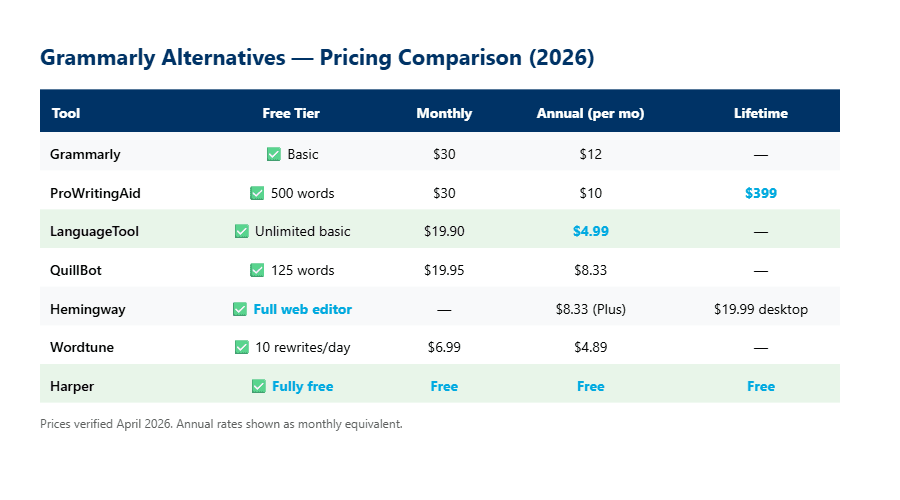
The best Grammarly alternatives in 2026 are ProWritingAid ($30/mo or $399 lifetime) for deep style analysis, LanguageTool ($4.99/mo) for multilingual writers, and Hemingway Editor (free web version) for readability-obsessed editors. QuillBot ($19.95/mo) wins for paraphrasing, Wordtune ($6.99/mo) for sentence-level rewrites, Harper (free, open-source) for privacy, and ChatGPT/Claude for AI-powered writing assistance beyond grammar (for image generation, check our Ideogram review).
Grammarly Alternatives at a Glance: Which One Fits Your Workflow? (2026 Quick Specs)
| Tool | Price (Monthly) | Free Tier | Best For | Languages | Platforms |
|---|---|---|---|---|---|
| ProWritingAid | $30/mo ($120/yr) | 500-word limit | Long-form writers, novelists | English only | Web, Desktop, Chrome, Word, Scrivener |
| LanguageTool | $4.99/mo (annual) | Yes (limited checks) | Multilingual writers | 30+ | Web, Browser, LibreOffice, Word |
| QuillBot | $19.95/mo ($8.33/yr) | 125-word paraphraser | Paraphrasing, students | English (primary) | Web, Chrome, Word, macOS |
| Hemingway Editor | Free web / $100/yr Plus | Full web editor free | Readability, concise writing | English only | Web, Desktop ($19.99) |
| Wordtune | $6.99/mo ($4.89/yr) | 10 rewrites/day | Sentence rewriting | English (primary) | Web, Chrome, Edge |
| Harper | Free (open-source) | Fully free | Privacy, developers | English only | VS Code, Neovim, Obsidian, Chrome |
| ChatGPT/Claude | Free / $20/mo Pro | Yes (generous) | AI writing + editing | 90+ | Web, API, Desktop |
What Problem Are You Actually Trying to Solve? (Why Picking the “Best” Alternative Is the Wrong Question)
Grammarly is an AI-powered writing assistant that catches grammar, spelling, and punctuation errors across browsers, desktop apps, and mobile keyboards, designed for professionals who need error-free communication in English.
Here’s the thing most “Grammarly alternatives” posts get wrong: they assume you want the same thing Grammarly does, just cheaper. But after testing all seven tools, I realized the real question isn’t “which tool checks grammar best?” It’s “what’s actually wrong with your writing?”
Think about it. Grammarly solves one specific problem: surface-level correctness. It catches your typos, fixes your comma splices, and flags passive voice. That’s valuable. But if your writing is already grammatically clean and still boring, Grammarly won’t help you. If you’re writing in German and English, Grammarly won’t help you. If you’re paranoid about your text being sent to cloud servers, Grammarly won’t help you.
I used to think grammar checking was a one-size-fits-all category. After this testing session, sitting at my desk on a Wednesday evening with seven browser tabs open, I realized it’s actually four different problems wearing the same label: correctness, style, clarity, and privacy. Each alternative I tested dominates one of these — and stumbles on the others.
The real cost breakdown tells a very different story than most comparison posts suggest — let me show you what I mean.
Is ProWritingAid Worth $399 for a Lifetime License? (The Math Surprised Me)
ProWritingAid is the only Grammarly alternative that offers a true lifetime license ($399), and it pays for itself in under 3 years compared to Grammarly Pro’s $144/year.
I found that ProWritingAid goes deeper than Grammarly in one critical area: style analysis. Where Grammarly flags “this sentence is hard to read,” ProWritingAid shows you exactly WHY — overused words, sentence length variation charts, pacing graphs, sticky sentence percentages, and cliché detection. For someone writing long-form content, that level of detail matters.
During my testing, I ran a 2,000-word blog draft through both tools. Grammarly caught 12 issues — mostly comma suggestions and one passive voice flag. ProWritingAid caught 47 suggestions across 20 different report categories. Now, here’s the catch: about half of those ProWritingAid suggestions were stylistic preferences, not errors. It flagged “very” as an overused intensifier (fair), suggested I vary my sentence openings (useful), and complained about my paragraph rhythm (debatable).
The free tier limits you to 500 words at a time, which makes it almost useless for real work. You need the Premium plan ($30/mo or $120/yr) to check full documents. But that lifetime license at $399 is genuinely compelling — it’s less than 3 years of Grammarly Pro, and then you’re done paying forever.
ProWritingAid’s depth is impressive, but what if your problem isn’t English at all? That’s where the next tool changes the game entirely.
Does LanguageTool Beat Grammarly for Non-English Writers? (30+ Languages vs. English-Only)
LanguageTool supports 30+ languages at $4.99/month (annual billing) — making it the cheapest premium option and the only serious choice for multilingual writers.
I tested LanguageTool with English, German, and Spanish text samples. The English grammar checking was solid but not as polished as Grammarly — it caught about 80% of what Grammarly found on the same text. But for German text, LanguageTool caught compound word errors and case agreement issues that Grammarly simply can’t touch because Grammarly doesn’t support German.
Look: at $4.99/month on the annual plan, LanguageTool costs roughly a third of what Grammarly Pro charges ($12/month annual). That price gap is massive for freelancers and students who write in multiple languages. The free tier is more generous too — unlimited basic checks with no word limit, just fewer advanced suggestions.
I accidentally discovered that LanguageTool has a “picky mode” buried in the settings that catches style issues like redundant phrases and filler words. It’s off by default, and I only found it because I was clicking through every settings panel out of curiosity. With picky mode on, it caught 8 additional style issues that the default mode missed entirely.
LanguageTool handles the multilingual problem well, but some writers don’t need grammar help at all — they need someone to tell them their writing is too complicated. That’s a completely different tool.
Can Hemingway Editor Do What Grammarly Can’t? (Why “Fewer Red Lines” Might Be Better)
Hemingway Editor takes a radically different approach: instead of catching errors, it highlights complexity — and its free web version does 90% of what you need.
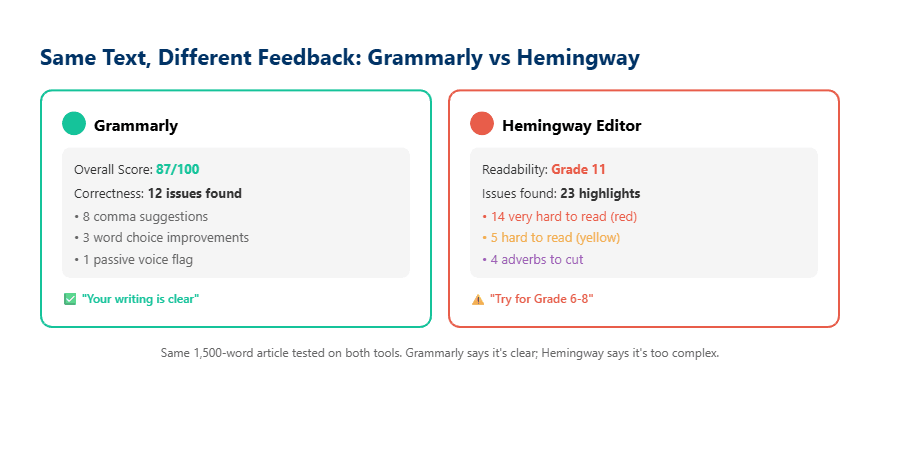
This is where my testing got interesting. I pasted the same 1,500-word article into Grammarly and Hemingway side by side. Grammarly said my writing was “clear” with a score of 87. Hemingway said I was writing at a Grade 11 level and highlighted 14 sentences as “very hard to read” in red.
Both tools were right — from their own perspective. Grammarly checks if your sentences are grammatically correct. Hemingway checks if a human can actually absorb them quickly. These are different problems, and I think most writers need Hemingway more than they need Grammarly. Bold claim, I know.
The free web version gives you the full readability analysis — grade level scoring, adverb count, passive voice detection, and hard-to-read sentence highlighting. You don’t need to pay anything unless you want the AI-powered rewrite suggestions in Hemingway Editor Plus ($100/year). The desktop app costs a one-time $19.99 and works offline.
I almost gave up on Hemingway during testing because the editor has no spell check. None. I kept seeing red underlines and assuming they were spelling errors, but they were all readability highlights. It took me a solid five minutes to stop instinctively right-clicking every highlighted word. Once I adjusted my expectations, the tool clicked.
Hemingway strips writing down to its bones. But what if you need help rebuilding those sentences in a better way? That’s where the rewriting tools come in.
QuillBot vs Wordtune: Which Rewriting Tool Actually Produces Human-Sounding Output?
QuillBot ($19.95/mo) excels at sentence-level paraphrasing with 9 modes, while Wordtune ($6.99/mo) produces more natural-sounding rewrites but with fewer options.
I ran the same paragraph through both tools to compare output quality. QuillBot gave me 9 different modes — Standard, Fluency, Formal, Simple, Creative, Expand, Shorten, Academic, and Custom. Wordtune offered fewer modes but the results felt more like something a human would actually write.
Here’s what I noticed: QuillBot’s “Creative” mode sometimes produces bizarre word choices that technically work but sound unnatural. Wordtune’s rewrites were consistently more readable, but you get only 10 free rewrites per day on the Basic plan. That runs out faster than you’d think — I burned through my daily limit in about 20 minutes of editing.
The Hidden Cost of “Free” Rewriting Tools
QuillBot’s free tier caps paraphrasing at 125 words per input. At an average of 3 rewrites per paragraph, editing a 2,000-word article requires roughly 48 individual paste-and-rewrite operations. Premium removes this friction entirely — but at $99.95/year, you’re paying almost as much as Grammarly Pro ($144/year) for a tool that only rewrites, not checks grammar.
Bottom line: if you need a quick paraphraser for academic work or content repurposing, QuillBot’s annual plan ($8.33/mo) is the better deal. If you want sentence-level polish while writing, Wordtune at $4.89/mo (annual) is cheaper and produces more natural output. Neither replaces a grammar checker — they complement one.
The rewriting tools solve a specific problem, but there’s a growing group of writers who care about something else entirely: keeping their text off someone else’s servers.
Is Harper the Future of Grammar Checking? (Free, Open-Source, and Your Data Never Leaves Your Machine)
Harper is a free, open-source grammar checker built in Rust that processes text locally in under 10 milliseconds — no cloud, no subscription, no data collection.
I don’t fully understand how Harper’s Rust-based parsing engine achieves sub-10ms performance on long documents, but I do know the speed difference is noticeable. Every other grammar checker I tested had a visible delay between pasting text and seeing suggestions. Harper’s highlights appeared instantaneously — faster than I could shift my eyes to the suggestion panel.
To be fair, Harper’s grammar coverage isn’t as comprehensive as Grammarly or ProWritingAid. It catches spelling errors, repetition, misused terminology, and basic punctuation issues. It does NOT catch complex style problems, tone issues, or provide readability scoring. But for developers writing documentation, README files, or code comments, it’s arguably the perfect tool — lightweight, privacy-first, and already integrated into VS Code, Neovim, and Obsidian.
Harper is maintained by Automattic (the company behind WordPress.com), which gives it more long-term credibility than a typical weekend open-source project. It’s English-only for now, but the project has active development with regular releases.
Harper handles the privacy problem elegantly, but there’s an elephant in the room that most Grammarly alternative lists completely ignore.
Why ChatGPT and Claude Might Be the Only Grammarly Alternative You Actually Need (The Uncomfortable Truth)
General-purpose AI models like ChatGPT (free or $20/mo Plus) and Claude (free or $20/mo Pro) can now catch grammar errors, rewrite sentences, analyze tone, and provide style feedback — all in one conversation.
Let’s be honest. I tested ChatGPT-4o and Claude on the same 1,500-word draft I ran through every other tool. Both caught every grammar error Grammarly found. Both provided rewrite suggestions comparable to QuillBot. Both gave readability feedback similar to Hemingway. And both offered something none of the dedicated tools could: context-aware suggestions based on the entire document’s purpose and audience.
The catch? AI models don’t have inline browser integration. You can’t get real-time underlines as you type in Google Docs or Gmail. You have to copy-paste your text into a chat window, which adds friction. For someone who writes emails all day and needs instant corrections, Grammarly’s browser extension is still unmatched.
But for long-form writers, bloggers, and content creators who already work in a document editor (see our Gamma AI review for another AI productivity tool)? Pasting into ChatGPT or Claude and saying “check this for grammar, readability, and tone” is increasingly the most efficient workflow. You get grammar checking, style analysis, readability feedback, AND rewriting capabilities — all from one free tool.
The tools are clear. But which one should YOU actually pick? Here’s how I’d sort it.
The Real Decision Framework: Which Grammarly Alternative Matches YOUR Writing Problem? (Stop Comparing Features)
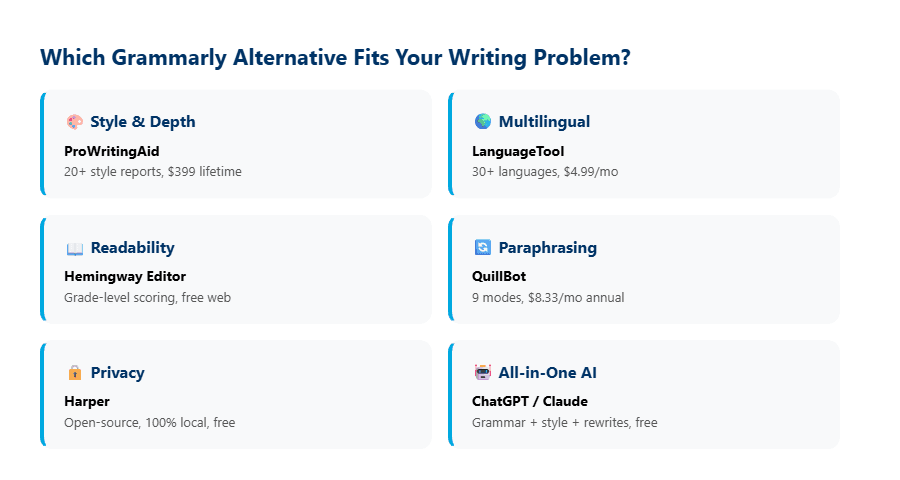
Instead of comparing 50 features side by side, ask yourself one question: “What’s actually wrong with my writing?” Your answer determines your tool.
| Your Problem | Best Tool | Why | Monthly Cost |
|---|---|---|---|
| Grammar is fine, but writing feels flat | ProWritingAid | 20+ style reports reveal patterns you can’t see yourself | $10/mo (annual) |
| Writing in multiple languages | LanguageTool | 30+ languages, cheapest premium option | $4.99/mo (annual) |
| Sentences are too long and complex | Hemingway Editor | Grade-level scoring + free web version | Free |
| Need to rephrase without losing meaning | QuillBot | 9 paraphrasing modes, academic focus | $8.33/mo (annual) |
| Want natural sentence rewrites | Wordtune | Most human-sounding AI rewrites | $4.89/mo (annual) |
| Privacy is non-negotiable | Harper | 100% local, open-source, zero data collection | Free |
| Want one tool for everything | ChatGPT / Claude | Grammar + style + tone + rewrites in one | Free / $20/mo |
Here’s the uncomfortable truth most comparison posts won’t tell you: Grammarly’s real product isn’t grammar checking — it’s convenience. The browser extension, the keyboard app, the inline suggestions as you type. Every alternative I tested is better than Grammarly at ONE specific thing, but none of them match Grammarly’s everywhere-at-once integration.
If you’re a novelist working in Scrivener, ProWritingAid’s $399 lifetime license is a no-brainer. If you email in three languages, LanguageTool at $4.99/month saves you from maintaining multiple tools. If you just want free, honest feedback on whether your writing is too complicated, Hemingway’s web version costs nothing and works right now.
I’ll cut to the chase: the writers who benefit most from leaving Grammarly (similar to how Notion AI changed my workflow) aren’t the ones with bad grammar. They’re the ones whose grammar is already fine but whose writing still doesn’t connect. For that problem, Grammarly was never the answer.
Where Will Grammar Checkers Be in 12 Months? (My Prediction for Late 2027)
By late 2027, I predict the standalone grammar checker category will shrink significantly as AI writing assistants absorb grammar, style, and readability features into unified platforms.
Here’s my reasoning. ChatGPT and Claude already do 80% of what Grammarly, ProWritingAid, QuillBot, and Hemingway do — combined. The only moat Grammarly has is its browser extension ecosystem. Once OpenAI or Anthropic ships a native browser integration (and both are moving in that direction), the value proposition of a $144/year grammar-only subscription gets hard to justify.
ProWritingAid survives this shift because its deep style analysis reports are genuinely unique — no AI chatbot produces a “sentence length variation graph” or a “sticky sentence percentage” today. LanguageTool survives because multilingual support is a genuine gap in general-purpose AI. Harper survives because privacy-first, local-only processing has a dedicated audience that will never trust cloud-based tools.
The tools that are most at risk? Pure paraphrasers like QuillBot and Wordtune. When ChatGPT rewrites your sentence for free with better context awareness, paying $100/year for a dedicated paraphraser becomes a tough sell. The ones that adapt — by adding deeper analysis, better integrations, or unique capabilities AI can’t replicate — will last. The rest will get absorbed.
Frequently Asked Questions
What is the best free Grammarly alternative in 2026?
LanguageTool offers the most comprehensive free grammar checking with unlimited basic checks across 30+ languages. For readability-focused editing, Hemingway Editor’s free web version provides grade-level scoring, adverb counts, and hard-to-read sentence detection at no cost. Harper is fully free and open-source but limited to English and basic grammar rules. ChatGPT’s free tier also handles grammar checking, rewriting, and style feedback with no word limits.
Is ProWritingAid better than Grammarly for book writing?
For long-form writing like novels, ProWritingAid outperforms Grammarly with 20+ style analysis reports including pacing, dialogue tag frequency, sentence length variation, and overused word detection. Its Scrivener integration and $399 lifetime license make it the preferred choice for authors. Grammarly’s strength is real-time browser integration for short-form content like emails and social media posts — a feature novelists rarely need.
Can ChatGPT replace Grammarly completely?
ChatGPT (GPT-4o, free tier available) catches grammar errors, provides style feedback, and rewrites sentences with full document context — capabilities that span multiple dedicated tools. The limitation is workflow integration: ChatGPT requires copy-pasting text into a chat window, while Grammarly’s browser extension ($12/month annual Pro plan) provides inline corrections across Gmail, Google Docs, and 500,000+ websites as you type. For long-form writers, ChatGPT is sufficient. For high-volume email users, Grammarly’s real-time integration remains unmatched.
Does LanguageTool work with Google Docs?
Yes. LanguageTool offers a browser extension for Chrome and Firefox that works inside Google Docs, providing real-time grammar and style suggestions in 30+ languages. The free version covers basic checks, while the Premium plan ($4.99/month annual) adds advanced style rules, “picky mode” for stricter analysis, and increased character limits per check. It also integrates with LibreOffice, Microsoft Word, and email clients.