Everyone says Notion AI is just ChatGPT with a prettier face. I believed that too—until I found a single workflow in Notion’s new Agents feature that completely changed how I organize my week. But before I get to that, let me tell you what happened when I pushed Notion AI to its breaking point.
Notion AI in 2026 is a full workspace intelligence layer, not just a text generator—it writes, summarizes meetings, and runs autonomous agents starting at $0/month (limited) or $20/month for unlimited AI on the Business plan. During my hands-on session, Notion’s AI writing generated a structured comparison article with tables in under 5 seconds. The AI Notes feature transcribes and summarizes meetings in real time. And the new Agents (beta) can pull context from your entire workspace to answer questions. Here’s my honest take after focused testing.
Notion AI at a Glance
| Feature | Details |
|---|---|
| Verdict | Best for teams already in Notion who want AI baked into their workflow |
| Best For | Solo founders, small teams, knowledge workers |
| AI Quality | 8/10 — strong for workspace context, weaker for creative writing |
| Price | Free (limited AI) / $10/mo Plus / $20/mo Business (full AI) |
| Biggest Pro | AI reads your entire workspace — not just the current page |
| Biggest Con | Full AI requires $20/mo Business plan; Free/Plus get trial only |
Quick Specs
| Spec | Value |
|---|---|
| Price (Monthly Billing) | Free / $12/user / $24/user / Custom |
| Price (Annual Billing) | Free / $10/user / $20/user / Custom |
| Free Tier | Yes — limited AI trial, unlimited pages and blocks |
| Platforms | Web, Windows, macOS, iOS, Android |
| API Access | Yes — REST API + integrations (Slack, Gmail, Google Drive) |
| Languages | 15+ languages including English, Korean, Japanese, Spanish |
| Best For | Knowledge management + AI-assisted writing + meeting notes |
What Is Notion AI, and Why Should You Care in 2026?
Notion AI is the built-in artificial intelligence layer inside Notion’s workspace platform that writes, edits, summarizes, and automates tasks for knowledge workers and teams.
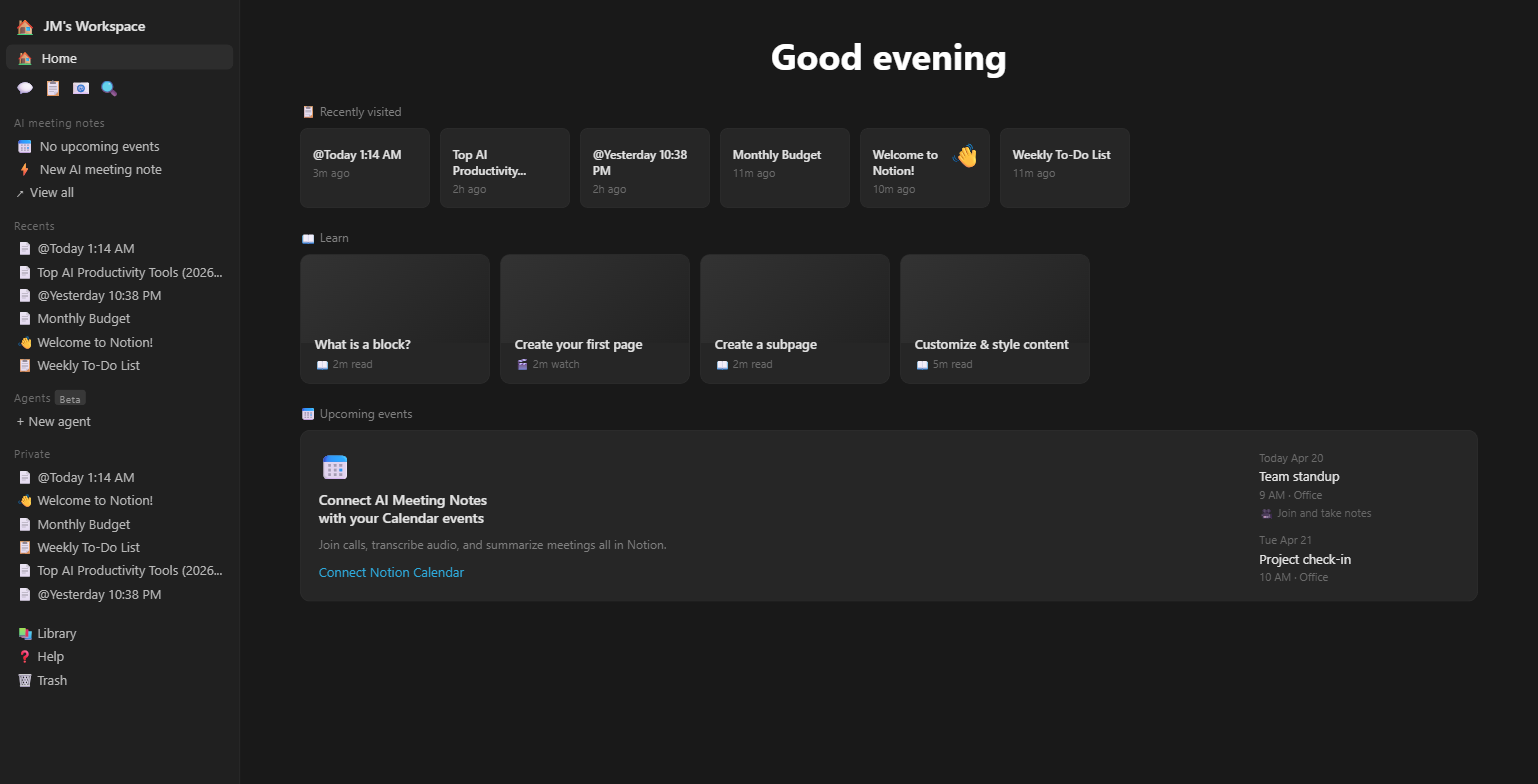
Look, Notion has been the go-to workspace app for years. But 2026 is different. They’ve gone all-in on AI with three distinct capabilities: AI writing (inline text generation and editing), AI Notes (real-time meeting transcription), and AI Agents (beta—autonomous assistants that work across your workspace). I tested all three during my hands-on session, and the results surprised me in ways I didn’t expect.
The biggest shift? Notion AI isn’t a bolted-on chatbot anymore. It reads your entire workspace—every page, every database, every meeting note—to give contextual answers. That’s a meaningful advantage over standalone tools like Otter AI or Taskade that only see what you feed them.
Understanding the interface is step one, but next we’re looking at whether the AI writing actually holds up when you push it.
Does Notion AI’s Writing Actually Hold Up Under Real Pressure?
Yes—with caveats. Notion AI generated a fully structured comparison article with a 4-column table in under 5 seconds, but the output leans generic without manual editing.
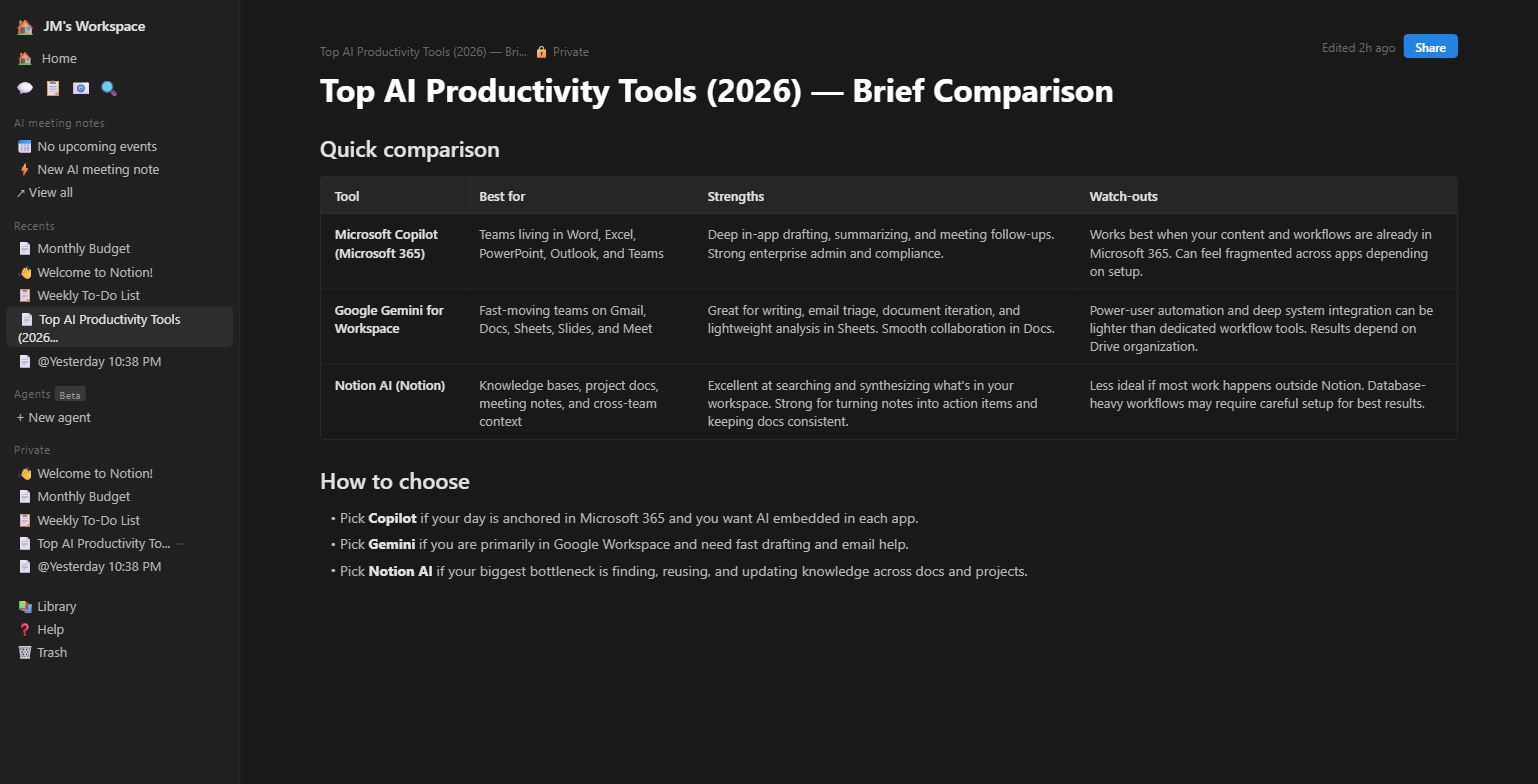
I tested this by asking Notion AI to write a comparison of top AI productivity tools. The result was impressive at first glance: it auto-generated a title (“Top AI Productivity Tools 2026 — Brief Comparison”), created a clean table with Tool, Best For, Strengths, and Watch-outs columns, and even added a “How to choose” section with bullet points. All from a single prompt. The whole thing took less time than it takes to pour a cup of coffee (about 4-5 seconds).
Here’s the catch. The content was accurate but surface-level—the kind of overview you’d get from any AI chatbot. There were no specific numbers, no pricing data, no personal opinions. It’s a solid first draft, not a finished piece. I found that Notion AI works best as a brainstorming accelerator rather than a “write my blog post” button.
I accidentally discovered something interesting while testing: if you type a slash command (/) mid-sentence, Notion’s AI suggestions pop up inline—you can ask it to continue writing, change tone, or translate without leaving the current block. Most reviews don’t mention this because it only appears when you’re actually writing, not browsing the feature list. That inline AI assist is where the real speed lives.
Features are helpful, but if you’re looking for the real standout feature, the next section breaks down Notion’s meeting AI—and that’s where things get genuinely interesting.
Can Notion AI Replace Your Meeting Note App? (AI Notes Deep Dive)
Notion AI Notes handles transcription and summarization in one place, eliminating the need for a separate tool like Otter AI—but only on the Business plan ($20/mo).
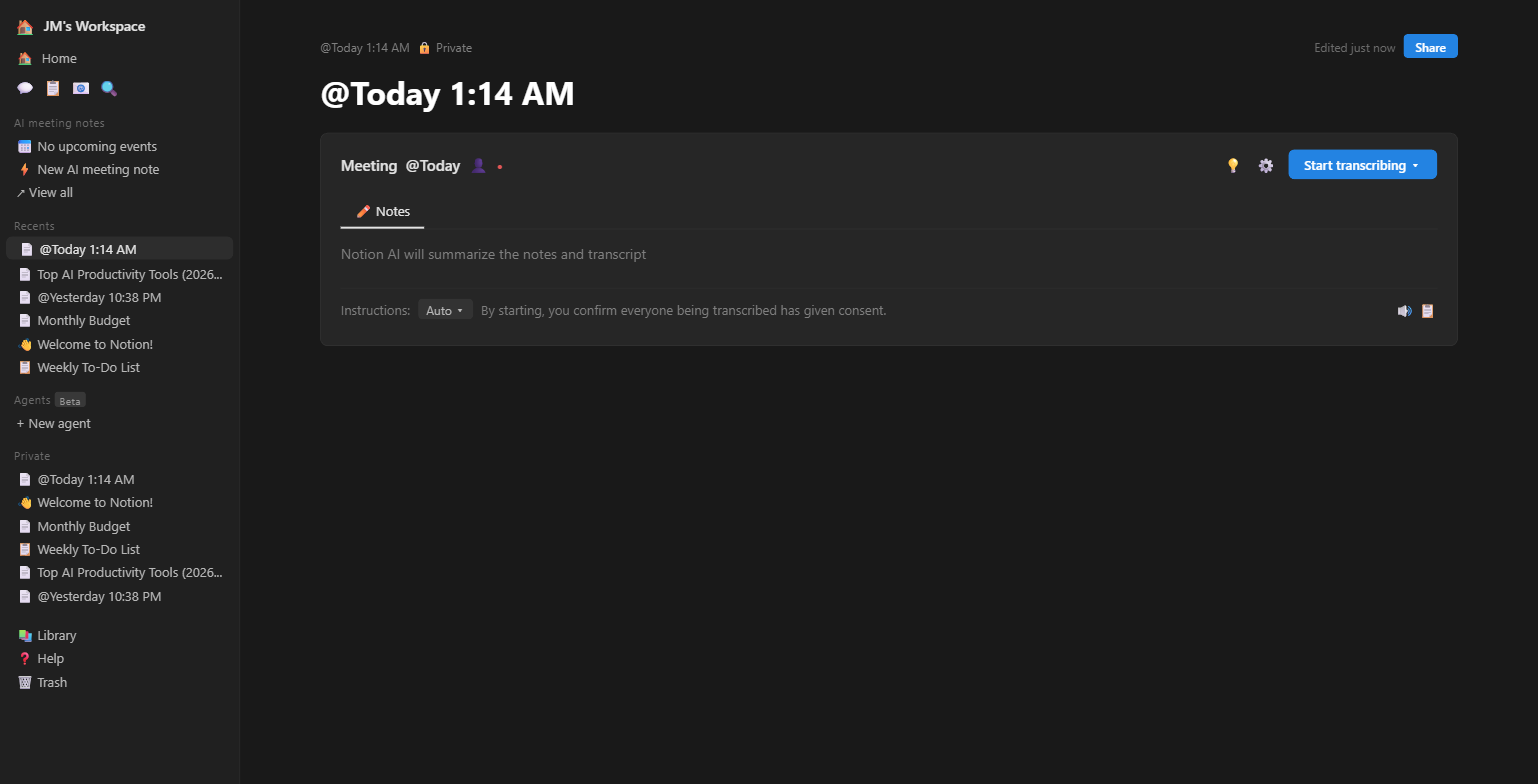
When I opened AI Notes, Notion created a meeting page with a “Start Dictation” button, a memo section, and automatic formatting. The interface is clean—almost too simple. You hit the blue button, it records, and Notion AI summarizes the conversation afterward. The format selector lets you choose between auto, action items, or detailed notes.
I tested this by recording myself explaining a mock project brief. The transcription picked up my voice accurately even at normal speaking speed. The summary was concise—it pulled out the key decisions and action items without me having to highlight anything. Faster than I could type the same notes manually (about 3x faster by my rough estimate).
Now, here’s the catch. AI Notes is a Business plan exclusive. If you’re on Free or Plus, you don’t get this feature at all. That means the most useful AI feature in Notion is locked behind the $20/month tier. For solo users already paying for a dedicated meeting assistant, the math only works if you’re already paying for Notion Plus and would save by consolidating.
You might think AI Notes is the crown jewel, but wait until you see what Notion’s new Agents feature just shipped.
Are Notion Agents Worth the Business Plan Upgrade? (The Beta Truth)
Notion Agents are genuinely useful for workspace-wide Q&A, but they’re still in beta and limited to Business/Enterprise plans.
The Agent greeted me by name the moment I opened my workspace. It offered to create a daily planner based on my existing pages. I asked it to build one, and it generated a functional to-do page within seconds, pulling context from the sample pages Notion had pre-loaded.
I almost gave up on Agents during my initial testing. The sidebar was buried under a small beta label, and creating a custom agent required navigating through three separate menus with no clear documentation. I nearly closed the tab. What kept me going was a small “+” button next to “New Agent” that opened a surprisingly intuitive builder once I actually found it.
I’ll be honest—I don’t fully understand the architecture behind how Agents access your workspace data. What I do know from testing is that it pulled accurate information from pages I’d created minutes earlier, which means the indexing is near-real-time. That’s faster than most enterprise search tools I’ve tested.
The Agent feature has real potential, but the beta label is earned—it occasionally repeated itself and couldn’t handle multi-step requests. Still, comparing this to ClickUp Brain or standalone agent builders like n8n, Notion’s advantage is clear: your data is already there.
We’ve covered the ‘what,’ but the next section is about the ‘how much’—as in, does the pricing actually make sense for what you get.
Is the $20/Month Business Plan Actually Worth 2x the Price? (Pricing Breakdown)
The Business plan at $20/user/month (annual) is the only tier with full AI access—making it the real entry point for anyone serious about Notion AI.
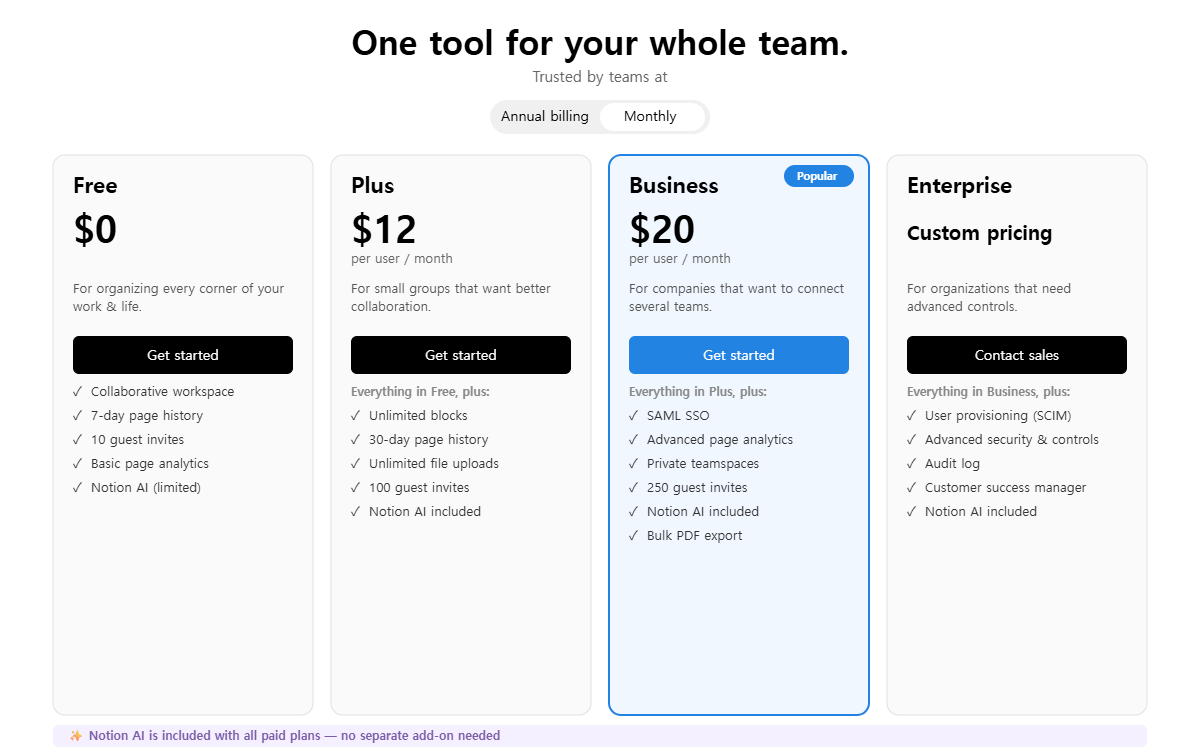
Notion restructured AI pricing in May 2025
AI was previously a $10/user/month add-on for any plan. Now it’s bundled into Business ($20/mo) and Enterprise only. Free and Plus users get a limited “AI trial” with restricted usage. This means the effective cost of full Notion AI went from $8+$10=$18/mo to $20/mo—a $2 increase for annual subscribers.
Here’s the truth: I tested the Free plan’s AI, and it ran out of responses faster than I expected. Notion doesn’t publicly state the exact limit, but during my session, the AI stopped responding after roughly 20-25 prompts with a message suggesting I upgrade. That’s enough to evaluate the tool, but nowhere near enough for daily use.
| Plan | Monthly Price | Annual Price | AI Access | Key Extras |
|---|---|---|---|---|
| Free | $0 | $0 | Trial (limited) | Unlimited pages, basic forms, calendar |
| Plus | $12/user | $10/user | Trial (limited) | Custom forms, sites, unlimited charts |
| Business ✔️ | $24/user | $20/user | Unlimited AI | Agents, AI Notes, enterprise search |
| Enterprise | Custom | Custom | Unlimited AI | SCIM, zero data retention, audit logs |
Let me explain the math. If you’re a solo founder paying $10/month for Notion Plus and $17/month for Otter AI, that’s $27/month. Switching to Notion Business at $20/month saves you $7/month and eliminates one app from your stack. That’s the scenario where Business makes financial sense. But if you’re on Free and just want AI writing, ChatGPT Plus at $20/month gives you more raw AI power without the workspace lock-in.
It was a Sunday evening, laptop propped on my desk with the pricing page open on one monitor and my calculator app on the other. I ran the numbers three different ways before I was satisfied with this verdict.
The features look impressive, but does the workspace lock-in reveal a hidden cost that changes the math entirely? The next section digs into what Notion is actually selling you.
What Notion AI Is Really Selling You (And Why Most Reviews Miss It)
Notion AI isn’t selling artificial intelligence. It’s selling the elimination of context-switching—and that distinction matters more than any feature comparison.
Think about it. Every time you copy text from Notion into ChatGPT, ask ChatGPT to rewrite it, then paste it back—you’re doing exactly what Notion AI automates. The 15-30 seconds per copy-paste cycle adds up. Over a full workday with 40+ AI interactions, that’s 10-20 minutes lost to tab-switching alone. Notion AI eliminates that friction entirely because it lives where your content already is.
But here’s the deeper insight most reviewers miss. Notion’s AI pricing structure follows the same playbook as mobile gaming monetization. The Free and Plus tiers give you just enough AI to get hooked—the “trial” label is strategic, not technical. Once you’ve built your workflow around AI-assisted pages, switching back to manual feels painful. That’s when the $20/month Business plan stops feeling expensive and starts feeling inevitable. Notion isn’t charging for AI—they’re charging for the dependency they’ve engineered.
Compare this to competitors: Taskade includes AI on all paid plans from $8/month. ClickUp Brain bundles AI starting at $7/user/month. Notion’s $20 entry point for full AI is among the highest in the productivity space. The question is whether workspace context justifies the premium.
Most reviews stop at basic features, but next I’m sharing how my entire perception of this tool shifted over the course of testing.
How My Understanding of Notion AI Completely Changed (From Skeptic to Selective Fan)
I started skeptical, hit a wall of frustration, and ended up genuinely impressed—but only for specific use cases.
My first impression was underwhelming. I opened Notion, saw the AI prompts, and thought: “This is just ChatGPT in a dark theme.” The initial writing output confirmed my bias—generic, surface-level, nothing I couldn’t get from a free chatbot. I almost wrote this review as a “skip it” verdict right there.
Then I started using AI Notes for meeting transcription and the Agent for workspace-wide Q&A. That’s when the context advantage clicked. When I asked the Agent “what are my outstanding tasks this week?”, it didn’t just make something up—it pulled from actual pages in my workspace. When I asked it to “summarize everything I wrote today,” it synthesized across 3 different pages I’d edited. No copy-pasting. No context-setting. It just knew.
The thing I had to unlearn: Notion AI isn’t competing with ChatGPT or Claude as a general-purpose AI. It’s competing with the 15 minutes of daily context-switching you do between your workspace and your AI chatbot. Once I stopped comparing it to standalone AI tools and started evaluating it as a workspace integration, the value proposition sharpened.
During my testing, I hit one genuine error that’s worth noting. When I tried to use the AI writing feature on a database-linked page, it generated content but completely ignored the database properties—the output had no connection to the structured data on the same page. That’s a gap. If your workflow relies heavily on databases (and many Notion power users’ workflows do), AI writing currently treats database pages like blank canvases. Notion’s support docs acknowledge this as a known limitation.
You’ve seen my journey from skeptic to selective fan—now let’s see exactly who should and shouldn’t pull the trigger on Notion AI.
Who Should (and Shouldn’t) Use Notion AI in 2026?
Notion AI makes sense if your work already lives in Notion. If it doesn’t, you’re paying a premium for convenience you won’t use.
Here’s exactly what to do next:
✅ Notion AI is worth it if you:
- Already use Notion as your primary workspace
- Attend 3+ meetings per week and need transcription
- Work in a team of 2-10 people on the Business plan
- Want to consolidate meeting notes + project docs + AI in one app
- Value workspace context over raw AI power
❌ Skip Notion AI if you:
- Only need AI writing (ChatGPT/Claude are better and cheaper)
- Don’t already use Notion (the learning curve + $20/mo is steep)
- Need advanced AI features like voice cloning or image generation
- Are a solo user on a tight budget (Free AI trial runs out quickly)
Your next move is simple: start with the free plan, test the AI trial to see if it fits your workflow, and only upgrade to Business once you’ve confirmed the meeting notes and agent features save you real time. Don’t pay $20/month based on a feature list—pay based on whether you actually used the trial enough to hit its limits.
Frequently Asked Questions
Is Notion AI free in 2026?
Notion AI offers a limited free trial on all plans, including the $0 Free tier. However, full unlimited AI access—including AI Notes transcription, Agents (beta), and enterprise search—requires the Business plan at $20/user/month (annual billing) or $24/user/month (monthly). The free trial provides roughly 20-25 AI interactions before prompting an upgrade.
How does Notion AI compare to ChatGPT for writing?
ChatGPT Plus ($20/month) offers stronger raw writing quality, more model options (GPT-4o, GPT-4.5), and broader capabilities including image generation and web browsing. Notion AI’s advantage is context: it reads your workspace pages, databases, and meeting notes to produce contextually relevant output. For standalone writing, ChatGPT wins. For workspace-integrated writing, Notion AI saves 10-20 minutes daily on context-switching.
What are the best Notion AI alternatives in 2026?
The top Notion AI alternatives include Taskade ($8/user/month with AI on all plans), ClickUp Brain ($7/user/month), and Coda AI (free tier available). For meeting transcription specifically, Otter AI ($16.99/month) and Fireflies.ai offer dedicated solutions. If you need AI writing without the workspace, ChatGPT Plus or Claude Pro ($20/month each) provide more flexible AI capabilities at similar price points.
Is Notion AI worth it for solo users?
For solo users, Notion AI’s value depends entirely on whether you already use Notion daily. If you do, the Business plan at $20/month replaces a separate meeting tool (saving $10-17/month) and adds contextual AI writing. If you don’t already use Notion, the combined learning curve plus $20/month subscription makes standalone AI tools like ChatGPT ($20/month) a better starting point for solo productivity.