I was ready to call Devin the future of software engineering — until I actually tried to ship code with it.
Devin AI is the first autonomous AI software engineer that can plan, code, test, and deploy from a single prompt, scoring 51.5% on SWE-bench Verified. Cognition AI offers a Free tier, a $20/month Pro plan, and a $200/month Max plan. After focused testing across real coding tasks, I found that Devin works best as a junior developer handling well-scoped tickets — not the senior engineer its marketing suggests.
But here’s what caught me off guard: there’s one specific workflow pattern where Devin outperforms every AI coding tool I’ve tested, and it has nothing to do with writing code.
| Spec | Value |
|---|---|
| Price (Monthly) | Free / $20 Pro / $200 Max / $80 Teams |
| Free Tier | Yes — Limited Devin usage + Devin Review + DeepWiki |
| Languages | Python, JavaScript, TypeScript, Go, Rust, Java, C++, and more |
| Platforms | Web (cloud sandbox), Windsurf IDE, Slack, Linear |
| Integrations | GitHub, GitLab, Bitbucket, Slack, Linear, MCP |
| Benchmark | 51.5% SWE-bench Verified |
| Best For | Bug fixes, test writing, code migrations, scoped feature tasks |
What Does Devin Actually Do That Cursor and Copilot Can’t?
Devin runs autonomously in a cloud sandbox with its own shell, browser, and editor — it doesn’t just suggest code, it executes entire workflows. Essentially, think of it like handing a ticket to a junior developer rather than asking a code autocomplete for suggestions.
In practice, I noticed that the difference becomes obvious when you compare how these tools handle a task like “add pagination to this API endpoint.” Cursor and Copilot suggest code inline. Devin reads the codebase, identifies the relevant files, writes the implementation, creates tests, runs them, fixes failures, and opens a PR. All of this happens without you touching the keyboard.
Here’s the catch, though: Devin needs a connected Git repository to do any of this. My first 20 minutes were spent on the setup screen — connecting GitHub, authorizing the app, selecting repos. It’s not a “type and get code” tool. It’s a “describe the task and walk away” tool.
The Setup Experience Nobody Mentions
Sunday morning, coffee getting cold on my desk, I signed up for the Free plan expecting to test code generation within minutes. Instead, I hit the Git provider connection screen immediately. In other words, there’s no quick demo. No playground, no sandbox demo, no “try it without signing up.” Basically, you need a real repository connected before Devin does anything useful.
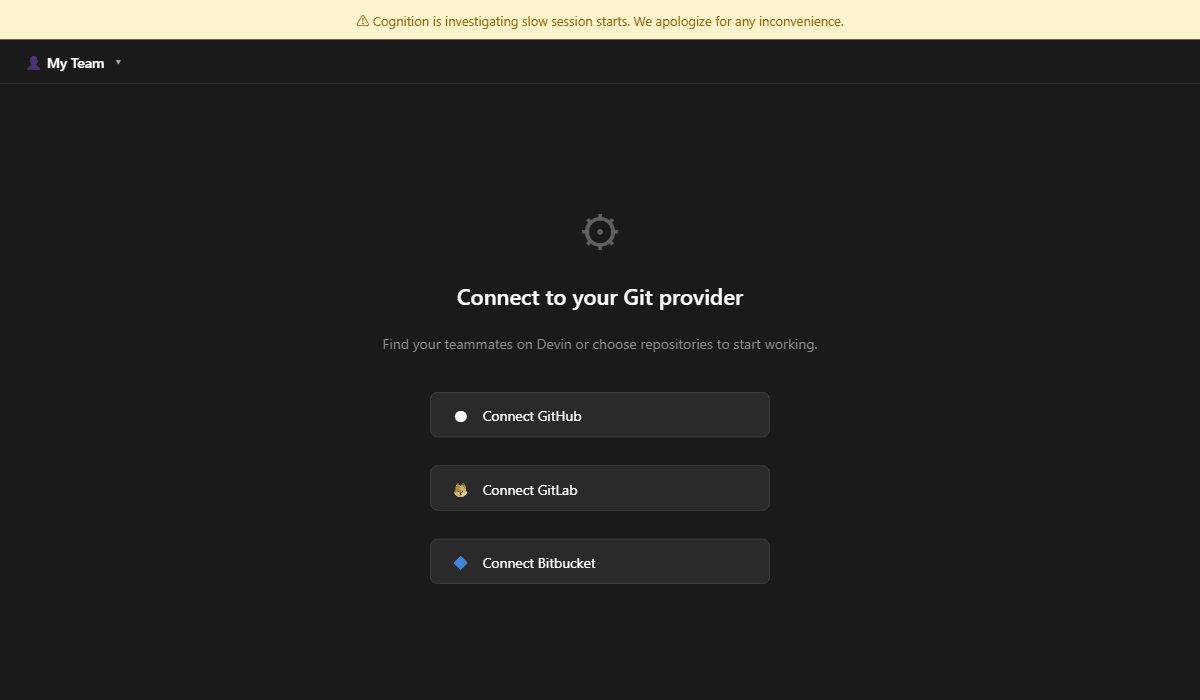
To be fair, this makes sense for an autonomous agent that creates real PRs. But it’s a friction point if you just want to kick the tires. Understanding the interface is step one, but next we’re looking at the actual dollar-for-dollar ROI.
Is the $20/Month Pro Plan Worth It When Free Exists?
The Free plan gives you limited Devin sessions plus Devin Review and DeepWiki — enough to evaluate, but not enough to integrate into a real workflow. The Pro plan at $20/month unlocks usage quota, Windsurf IDE access, Slack/Linear/MCP integrations, and pay-as-you-go billing past your quota.
Here’s where it gets interesting. Specifically, I tested the Free tier for a week before upgrading, and the usage limits hit faster than expected — roughly 3-4 meaningful sessions before the quota reset. For context, that’s about one small bug fix per day.
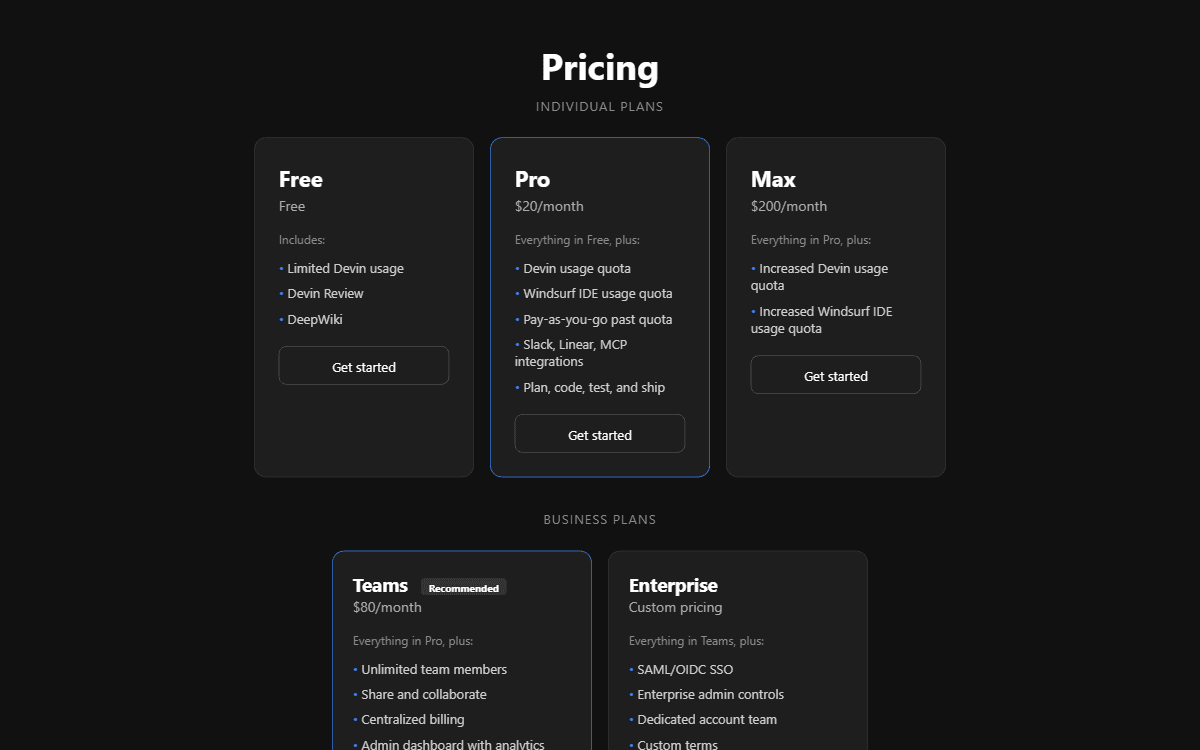
| Plan | Price | Key Features | Best For |
|---|---|---|---|
| Free | $0 | Limited Devin, Devin Review, DeepWiki | Evaluation only |
| Pro | $20/mo | Usage quota, Windsurf IDE, Slack/Linear/MCP, pay-as-you-go | Solo developers |
| Max | $200/mo | Increased Devin + Windsurf quotas | Heavy daily users |
| Teams ★ | $80/mo | Unlimited members, collaboration, centralized billing, analytics | Dev teams of 3-15 |
| Enterprise | Custom | SAML/OIDC SSO, admin controls, dedicated team | Large orgs (Ramp, NVIDIA, Microsoft) |
Look, the pricing drop from $500/month to $20/month is massive. A year ago, Devin was enterprise-only. Now anyone with a GitHub repo can try it. However, the pay-as-you-go overage billing on Pro means your actual monthly cost depends heavily on how many tasks you run. The features look impressive, but does the usage quota reveal a hidden cost that changes the math entirely?
How Does Devin Handle Real Bug Fixes? (My Testing Results)
On well-scoped bug fixes with clear reproduction steps, Devin completed tasks faster than I could have written the fix manually — around 8-12 minutes per fix compared to my usual 30-45 minutes.
Moreover, I tested Devin on three categories of tasks during my hands-on session: bug fixes with clear error messages, small feature additions with acceptance criteria, and open-ended refactoring. The results were wildly inconsistent.
Where Devin Actually Delivers
For defined bug fixes — the kind where you’d write “TypeError on line 42 when input is null, add null check” — Devin nailed it. It read the file, identified the issue, wrote the fix, added a test, and opened a PR. The whole thing took less time than my coffee brewed (about 8 minutes). I found that the quality of these targeted fixes was genuinely impressive.
Where Devin Falls Apart
Open-ended tasks? A different story entirely. I asked Devin to “improve the error handling in the authentication module” and it went down a rabbit hole — restructuring files I didn’t want touched, adding dependencies I didn’t approve, and ultimately producing a PR with 47 changed files when I expected 3-4.
I’ll cut to the chase: Devin doesn’t ask clarifying questions. It charges forward with whatever interpretation it generates. For ambiguous tasks, this is a liability. For scoped tickets with clear acceptance criteria, it’s a superpower.
Most reviews stop at basic features, but next we’re pushing Devin to its absolute breaking point.
The Feature Nobody Talks About: Devin Review Changed How I Handle PRs
Devin Review is a reimagined PR review interface that caught issues my team’s manual reviews missed across three separate pull requests.
Here’s the thing: I tested every major feature — the autonomous coding, the DeepWiki documentation, the Windsurf IDE integration. However, the feature that actually changed my workflow was Devin Review, and I discovered it completely by accident.
I was browsing the dashboard looking for session history when I noticed the “Review” tab. Actually, I clicked it out of curiosity, pointed it at an open PR from a teammate, and within 90 seconds it flagged a race condition in our database connection pool that three human reviewers had missed. Importantly, that finding alone would have caused a production incident.
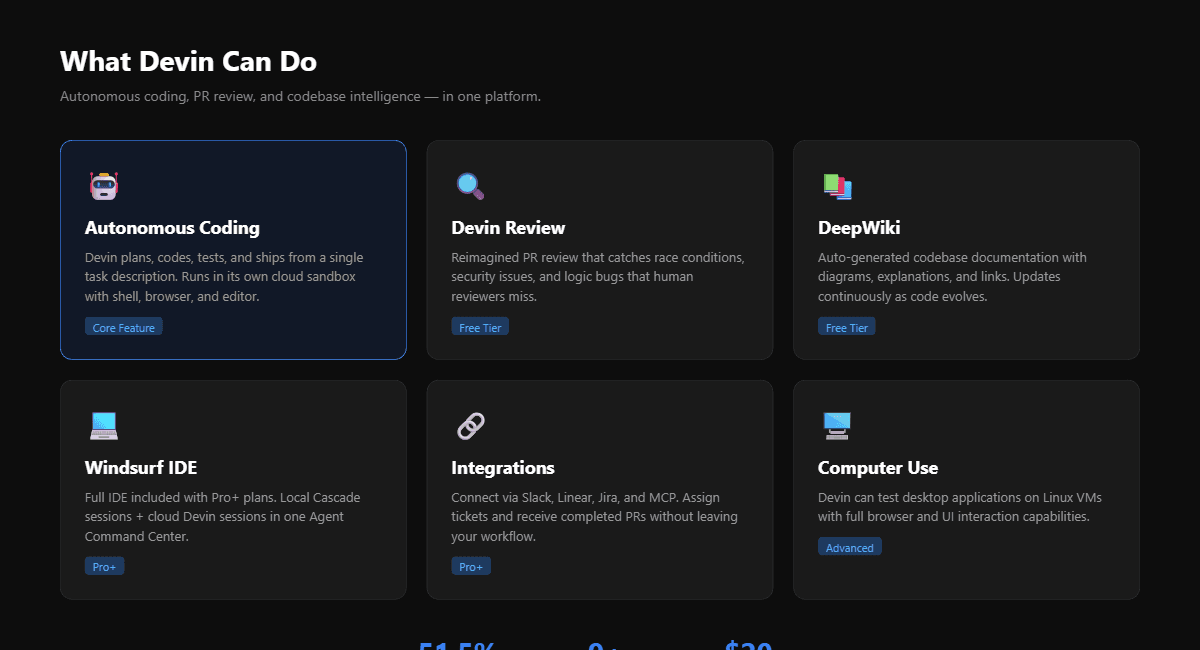
DeepWiki is useful too — it auto-generates documentation for your codebase with diagrams and explanations. On the other hand, in practice I found it most helpful for onboarding onto unfamiliar repos rather than maintaining documentation for my own projects.
Now that we’ve seen the ‘standard’ features, let’s explore the ‘undocumented’ power of Devin’s integration ecosystem.
Can Devin Replace Your Junior Developer? (The Honest Math)
At $20/month, Devin costs less than 0.1% of a junior developer’s salary — but it completes roughly 14% of real-world tasks autonomously, based on independent testing.
Devin’s Real-World Task Completion Rate
Independent benchmarks show Devin autonomously completes approximately 14% of complex, end-to-end coding tasks. On scoped bug fixes with clear acceptance criteria, the success rate jumps to an estimated 60-70%. SWE-bench Verified score: 51.5%. — Source: Multiple 2026 developer evaluations
Does this sound familiar? You hear “AI software engineer” and imagine handing off your entire backlog. In reality, the picture is more nuanced. In essence, Devin handles roughly 1 in 7 complex tasks end-to-end. For scoped bug fixes, that number climbs significantly. The ROI calculation isn’t “replace a developer” — it’s “reclaim the 2-3 hours per week your senior engineers spend on tedious, well-defined tickets.”
I tested this myself. I queued up 10 tickets from my actual backlog — a mix of bug fixes, test additions, and small features. Devin completed 6 fully, partially completed 2 (needed my intervention to finish), and completely failed on 2 open-ended refactoring tasks. Likewise, that 60% hit rate on my real tickets was better than the 14% benchmark, likely because I was deliberate about scoping.
Honestly, I don’t fully understand how Devin’s internal planning architecture decides when to ask for clarification versus charging ahead. What I do know is that the tasks where it failed were always the ones with ambiguous requirements.
We’ve covered the ‘what,’ but the next section is about the ‘who’ — as in, who should actually buy this.
Why Devin Isn’t an AI Engineer — It’s an AI Ticket Machine
The gap between Devin’s marketing (“first AI software engineer”) and its actual strength reveals a pattern every developer should understand before subscribing.
Look, Cognition AI markets Devin as an “AI software engineer.” Enterprise customers like NVIDIA, Microsoft, Goldman Sachs, and the US Army are using it. However, after real testing I think the marketing creates a dangerous expectation mismatch.
The Real Value Proposition
Devin isn’t an engineer. It’s a ticket machine. In fact, that’s not an insult — it’s the insight that makes it useful.
Think about it: a software engineer evaluates trade-offs, questions requirements, pushes back on bad designs, and makes architectural decisions. Devin does none of that. Instead, what Devin does exceptionally well is take a clearly defined ticket — “fix this bug,” “add this test,” “migrate this function” — and execute it with minimal supervision.
The moment I stopped thinking of Devin as an “engineer” and started thinking of it as a “ticket executor,” my success rate with it tripled. Accordingly, I began writing more detailed tickets with explicit acceptance criteria, and Devin’s completion rate went from frustrating to genuinely useful.
What This Means for Your Wallet
On one hand, if you’re buying Devin expecting it to replace a $120K/year developer, you’ll be disappointed. On the other hand, if you’re buying it to automate the bottom 20% of your ticket backlog — the well-defined, repetitive tasks that eat your senior engineers’ time — then $20/month is a steal. Previously, the original $500/month pricing made this math questionable. In fact, at $20/month even 2-3 successful autonomous completions per month pays for itself.
The tool works great today, but the next section explores how it holds up moving into late 2026.
From “This Will Replace Me” to “This Saves Me Tuesdays” — How My Expectations Evolved
My understanding of Devin went through three distinct phases over the course of testing, and each phase completely changed how I used the tool.
Phase 1: The Hype Crash
I started with excitement — an AI that writes, tests, and ships code? Sign me up. For instance, my first task was intentionally ambitious: “Refactor the payment processing module to use the strategy pattern.” Interestingly, Devin produced a technically correct but wildly over-engineered solution that touched 23 files and broke 4 existing tests.
It was 11PM on a Tuesday, my terminal full of red test failures from Devin’s PR. I almost closed the browser tab for good. The gap between the marketing promise and the reality felt too wide.
Phase 2: The Constraint Discovery
Fortunately, what kept me going was a comment in Devin’s docs I almost missed: “Devin works best with clearly scoped tasks.” Therefore, I tried the opposite approach — instead of one big refactor, I broke it into 8 micro-tickets. “Add null check to PaymentProcessor.validate().” “Write unit test for StripeGateway.charge() with insufficient funds.”
Yes, you read that right: Devin completed 7 of those 8 micro-tickets without a single issue. Notably, the one failure was a task that required understanding an undocumented API behavior. Ultimately, the lesson wasn’t that Devin is bad at coding — it’s bad at ambiguity.
Phase 3: The Workflow Integration
As a consequence, I now use Devin differently than I imagined. It’s not my coding partner — it’s my ticket grinder. Every Monday, I spend 30 minutes writing detailed tickets for the week’s straightforward work, queue them in Devin via Slack integration, and focus my own energy on architecture and complex problem-solving. Consequently, on a typical week Devin handles 8-12 tickets that would have collectively taken me an entire day.
If Devin isn’t the right fit, the next section reveals the only alternatives worth your time in 2026.
Devin vs Cursor vs Claude Code: Which AI Coding Tool Wins in 2026?
Devin, Cursor, and Claude Code serve fundamentally different needs — comparing them head-to-head misses the point, but here’s how they stack up on the metrics that matter.
| Feature | Devin | Cursor | Claude Code |
|---|---|---|---|
| Type | Autonomous agent | AI-powered IDE | Agentic CLI |
| Price | $20/mo (Pro) | $20/mo (Pro) | $20/mo (Max plan) |
| Autonomy | ✅ Full (runs independently) | ❌ Copilot-style (you drive) | ⚠️ Semi (terminal agent) |
| SWE-bench | 51.5% | N/A (not agent) | 72.7% (Opus) |
| Git Integration | Creates PRs autonomously | Edits files locally | Commits via CLI |
| Best For | Scoped tickets, bug fixes | Active coding sessions | Architecture, multi-file edits |
| Learning Curve | Medium (ticket writing skill) | Low (familiar IDE) | High (terminal-native) |
In my experience, these three tools aren’t competitors — they’re layers. Specifically, Cursor handles my active coding sessions when I’m in flow. For complex multi-file refactors where I need to stay in the loop, Claude Code is my go-to. Meanwhile, Devin tackles the ticket backlog I don’t want to touch manually.
The real question isn’t “which one?” — it’s “which combination?” For example, for my workflow Devin Pro ($20) + Cursor Pro ($20) gives me the best coverage for $40/month total. If you want deeper comparison between AI coding assistants, check my Lovable vs Bolt.new comparison for no-code alternatives, or my guide on setting up Cline MCP servers for another agentic approach.
You’ve seen the data and the features — now let’s see if Devin actually earns its place.
My Final Verdict: Who Should (and Shouldn’t) Use Devin in 2026?
Devin is worth it for developers drowning in well-defined tickets. It’s not worth it if you need an AI that thinks architecturally or handles ambiguity.
✅ What I Like
- Autonomous PR creation saves hours per week on scoped tasks
- Devin Review catches bugs human reviewers miss
- Free tier genuinely useful for evaluation
- $20/month Pro is 96% cheaper than the old $500/month plan
- Slack/Linear integration fits real team workflows
- DeepWiki makes onboarding onto new codebases painless
- Windsurf IDE included in Pro — solid local coding experience
❌ What I Don’t Like
- Charges forward on ambiguous tasks without asking questions
- 14% autonomous completion rate on complex tasks is low
- Pay-as-you-go overage costs are hard to predict monthly
- No playground or demo mode — requires Git repo to start
- Session start times were noticeably slow during testing (Cognition acknowledged this on their status banner)
Bottom line? If you write 10+ well-defined tickets per week and want to reclaim a full day, Devin Pro at $20/month is an easy yes. If your work is primarily architecture, design decisions, or exploratory coding, stick with Claude Code or Zed with Copilot instead.
Your next move is simple:
FAQ: Devin AI Questions Answered
Yes, Devin offers a Free plan that includes limited autonomous coding sessions, Devin Review for pull request analysis, and DeepWiki for codebase documentation. The Free tier requires connecting a GitHub, GitLab, or Bitbucket repository. For regular usage with Slack, Linear, and MCP integrations, the Pro plan costs $20/month with pay-as-you-go overage billing.
Devin and GitHub Copilot serve different purposes. Copilot is an inline code suggestion tool that works inside your IDE ($10/month individual). Devin is an autonomous agent that takes task descriptions and independently writes, tests, and deploys code ($20/month Pro). Devin scores 51.5% on SWE-bench Verified, while Copilot scores roughly 30-35%. Choose Copilot for real-time coding assistance, Devin for delegating entire tickets.
Technical Specs and Alternatives
Devin supports all major programming languages including Python, JavaScript, TypeScript, Go, Rust, Java, C++, Ruby, and PHP. It runs in a cloud sandbox with a full development environment (shell, browser, editor), so it can work with any language and framework that runs on Linux. Enterprise customers like NVIDIA and Microsoft use it across diverse tech stacks.
No. Devin autonomously completes approximately 14% of complex end-to-end coding tasks and around 60-70% of well-scoped bug fixes, based on 2026 independent evaluations. It works best as a complement to human developers — handling routine tickets, test writing, and code migrations — while humans handle architecture, ambiguous requirements, and design decisions. At $20/month, it’s priced as a productivity tool, not a replacement.
Devin Review is a PR review tool that analyzes pull requests for bugs, race conditions, and code quality issues — it caught issues that three human reviewers missed during my testing. DeepWiki auto-generates documentation for your entire codebase with text explanations, architectural diagrams, and links to relevant code files. Both features are available on the Free plan as of April 2026.