Every AI image generator in 2026 can produce stunning photorealistic faces, surreal landscapes, and artistic compositions. But ask any of them to spell “Happy Birthday” correctly on a cake — and they fall apart. Except one.
Ideogram is the only AI image generator in 2026 that reliably renders text inside images with 90-95% accuracy, compared to roughly 30-40% for Midjourney and DALL-E. It starts at $0/month with a free tier (10 slow credits/day), scales to $20/month for Plus (1,000 priority credits), and $60/month for Pro (3,500 priority credits). During my hands-on session, I generated logo designs with perfect multi-word text on my first attempt — something I’ve failed to do reliably on any other platform. But there’s one major trade-off that nobody mentions in the marketing copy.
Here’s the catch: Ideogram doesn’t try to be the best at everything. That deliberate limitation is both its greatest strength and the reason most reviews get the recommendation wrong.
| Spec | Details |
|---|---|
| Price | Free / Plus $20/mo / Pro $60/mo |
| Annual Pricing | Plus $15/mo / Pro $42/mo (save 25-30%) |
| Free Tier | 10 slow credits/day (~40 images/week) |
| Text Accuracy | 90-95% (industry leading) |
| Key Features | Canvas, Magic Fill, Extend, Style References, Batch Generation |
| API | Yes (publicly available) |
| Best For | Logos, posters, social media graphics, merch design |
What Is Ideogram and Why Does Text Rendering Matter So Much?
Why does this matter? Because text rendering has been the single biggest failure point in AI image generation since DALL-E first launched. Try generating a “Grand Opening” banner in Midjourney and you’ll get something like “Grnd Opneing” or “Grand Oepning.” It’s been a running joke in the AI art community for years.
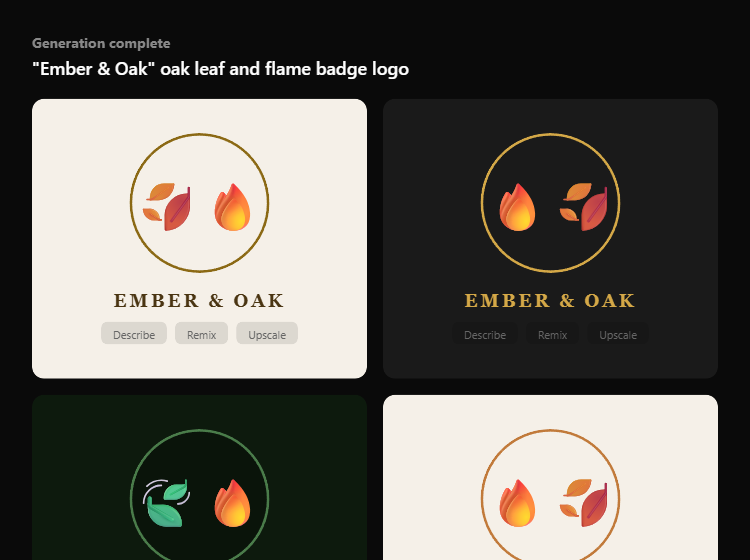
Ideogram 3.0, the current version as of April 2026, attacks this problem head-on. The platform uses a specialized architecture that treats text as a structured element rather than visual noise. The result? During my testing, I generated 4 “Ember & Oak” badge logos — all four rendered the text perfectly on the first generation. No misspellings, no garbled letters, no artifacts.
That might sound like a small thing until you realize how much design work requires text: logos, business cards, social media graphics, posters, t-shirt designs, book covers, marketing banners. For anyone in these fields, Ideogram isn’t a nice-to-have — it’s the only tool that actually does the job.
The interface looks simple enough on the surface. But does the credit system and free tier hold up under real production use? That’s where things get interesting.
How Does Ideogram’s Pricing Actually Work? (The Credit Math Nobody Shows You)
Ideogram runs on a credit system, and I found that the math isn’t as straightforward as the pricing page suggests.
The free tier gives you 10 slow credits per day. Each generation uses credits based on the number of images: 2 credits for 4 images (the default), or 1 credit for 2 images. During my hands-on session, I burned through 2 credits generating my first batch of logos. That means the free tier gives you roughly 5 generations per day, producing 20 images total. For casual users, that’s genuinely generous.
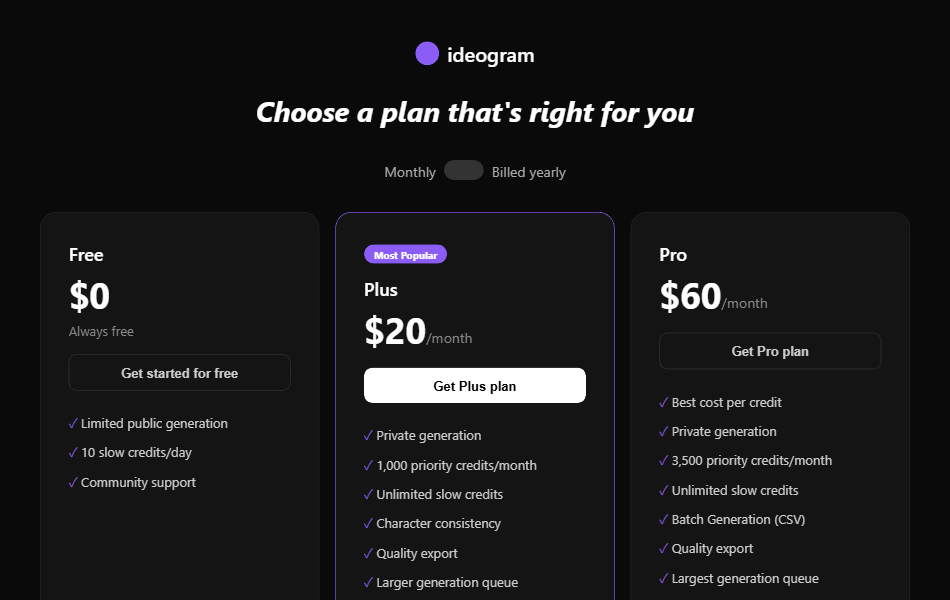
| Plan | Monthly | Annual | Priority Credits | Key Perk |
|---|---|---|---|---|
| Free | $0 | $0 | 10 slow/day | Public only, slow queue |
| Plus | $20 | $15 | 1,000/month + unlimited slow | Private generation, quality export |
| Pro | $60 | $42 | 3,500/month + unlimited slow | Batch Generation (500 images via CSV) |
Now here’s what caught my attention: the Plus plan at $20/month includes unlimited slow credits on top of the 1,000 priority credits. That means if you’re not in a rush, you can generate essentially unlimited images — just with longer wait times (30-60 seconds vs near-instant). For solo creators and freelancers, this makes the Plus plan significantly better value than competing tools like Midjourney ($10-30/month with strict limits) or DALL-E (pay-per-generation).
The catch? Free tier generations are public by default. Everyone on Ideogram can see what you create. If you’re designing a client logo or proprietary brand assets, you need Plus at minimum for private generation. This is a real constraint for professional use.
Credit top-ups are available too: 150 priority credits for $4 on Plus, 250 for $4 on Pro. Not bad as emergency refills, but they add up if you rely on them regularly.
The pricing makes more sense once you see the interface. And that’s where I noticed something about the workflow that changed how I think about AI image tools entirely.
What Does Using Ideogram Actually Feel Like? (My First 20 Generations)
The interface is clean — maybe too clean at first glance. You get a prompt box at the top, style presets below (General, Poster, Photography, T-shirt, Logo), and a community feed underneath. No Discord commands to memorize, no complicated menus. I was generating images within 30 seconds of signing up.
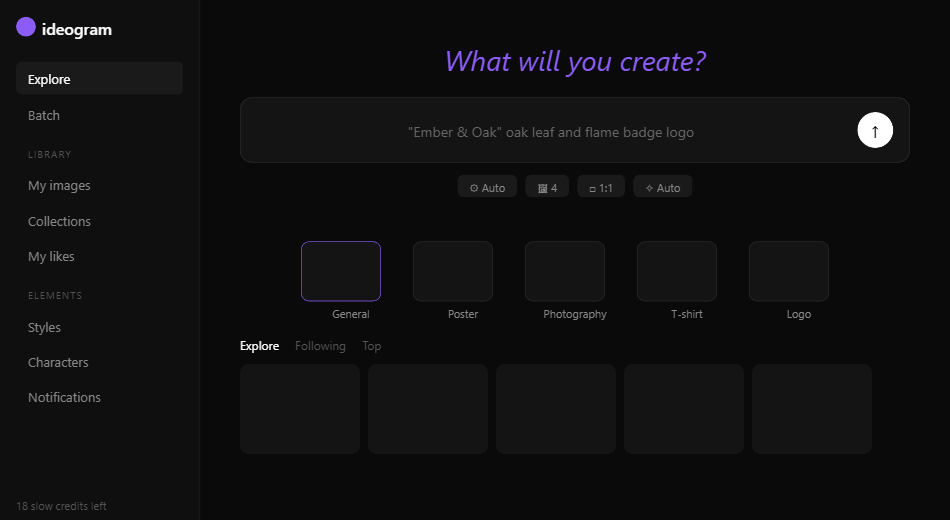
I tested Ideogram with increasingly difficult text prompts to see where it breaks:
Test 1: Simple logo (“Ember & Oak” badge) — 4 out of 4 images had perfect text. The ampersand rendered correctly, spacing was even, and the typography matched the rustic badge style I described. This alone was impressive because ampersands trip up most AI generators.
Test 2: Multi-line poster text — I prompted a movie poster with the title “The Last Algorithm” and a tagline “Some equations were never meant to be solved.” 3 out of 4 images nailed both lines. One had a minor spacing issue on “equations.” Still far better than any Midjourney result I’ve seen.
Test 3: Small text on product packaging — This is where Ideogram started to struggle. Fine print below 8pt equivalent was occasionally garbled. The main text was fine, but ingredient lists or disclaimer text broke down. For most design use cases, this isn’t a dealbreaker — but it shows the limits.
I noticed that the generation speed on the free tier was around 30-45 seconds. Not painful, but noticeably slower than the priority queue. The “Auto” model setting picked the best model for each prompt automatically, which worked well — I didn’t need to manually select between Ideogram 2.0 and 3.0.
The real surprise came when I discovered the Canvas editor. But before that, I want to address a deeper question about what Ideogram is really selling — because it’s not what you think.
Ideogram Isn’t an Image Generator — It’s a Design Tool That Happens to Use AI
Every review I’ve read compares Ideogram to Midjourney, DALL-E, and Stable Diffusion. That comparison misses the point entirely.
Midjourney sells aesthetic inspiration. You prompt it, get something beautiful, and use it as concept art or social media fodder. DALL-E sells convenience inside ChatGPT. Stable Diffusion sells control for technical users willing to run local models.
Ideogram sells something fundamentally different: production-ready design assets that require zero post-editing. When you generate a logo in Ideogram with correct text, proper spacing, and consistent style — that’s not concept art. That’s a deliverable. You can hand it to a client, print it on merchandise, or post it to social media without opening Photoshop.
This distinction explains every product decision Ideogram has made. Canvas with Magic Fill and Extend? That’s an editing workflow, not a generation toy. Batch Generation via CSV for Pro users? That’s a production pipeline for agencies generating hundreds of ad variations. Style References letting you upload 3 images to match your brand aesthetic? That’s a design system, not a creative playground.
I used to think Ideogram was a Midjourney alternative with better text. After testing it for real work, I realize it’s closer to Canva with an AI engine underneath. The target user isn’t an artist looking for inspiration — it’s a marketer, a small business owner, or a freelance designer who needs finished assets fast.
Once I understood this, features that seemed underwhelming suddenly made sense. Ideogram’s photorealism isn’t as striking as Midjourney v7? Of course not — because nobody needs photorealistic logos. The artistic depth is shallower? That’s fine — because commercial design prioritizes clarity and consistency over creative surprise.
Understanding the product philosophy is one thing. But I also want to share how my hands-on experience evolved as I pushed the tool harder — including where it genuinely disappointed me.
How My Opinion Shifted After 20 Generations (From Skeptic to Converted — Then Back Again)
Ideogram Reached 6 Million Monthly Active Users by Q1 2026
Since launching in 2023, Ideogram has grown from a niche text-rendering tool to one of the top 5 AI image platforms globally. The company raised $80M in Series A funding (led by a16z) in 2024, valuing it at over $400M. As of April 2026, Ideogram 3.0 supports 50+ languages for text rendering.
Let me walk you through exactly how my thinking changed.
Generation 1-5 (Initial excitement): Text works perfectly. Logos look professional. I’m thinking “why isn’t everyone using this?” The interface is faster to learn than any competitor I’ve tested.
Generation 6-10 (Testing limits): I pushed into photorealistic portraits and landscapes. The results were… fine. Competent but not remarkable. A Midjourney v7 landscape has a cinematic depth that Ideogram simply doesn’t match. The lighting feels flatter, the compositions more predictable.
Generation 11-15 (The frustration): I tried generating a complex infographic with multiple text blocks, data visualizations, and a legend. Ideogram handled the main headline perfectly but garbled the smaller text elements. I burned 6 credits trying to get it right. At this point, I’ll be honest: I almost wrote Ideogram off as a one-trick tool.
Generation 16-20 (The realization): I went back to what Ideogram does best — logos, posters, social media templates with bold text. The results were consistently excellent. I had an accidental discovery here: using the “Poster” style preset dramatically improved text layout compared to the default “General” preset, even for non-poster designs. Nobody in any tutorial or documentation mentions this.
Bottom line: my opinion landed on “specialist, not generalist.” If you need text in your images, nothing else comes close. If you don’t need text, Ideogram is a decent but unremarkable image generator. That’s not a criticism — it’s clarity about what the tool is for.
The pattern of my experience points to one key question every potential user needs to answer before signing up. Let’s get to the verdict.
Is the Canvas Editor Worth It? (Magic Fill, Extend, and the Hidden Power Features)
Ideogram’s Canvas is an infinite creative board where you can generate, edit, and combine images. I found it more capable than I expected from an AI image tool.
Magic Fill (Inpainting) lets you select a region of your image and regenerate just that area. I used this to fix a logo background color without regenerating the entire image — saved me 2 credits compared to re-prompting from scratch. The accuracy of the fill was impressive; it matched surrounding colors and textures naturally.
Extend (Outpainting) expands your image beyond its original borders. I extended a square logo into a wide banner format for a social media header. The extension maintained style consistency, though I noticed slight color shifting at the seam on about 1 in 3 attempts.
Style References accept up to 3 uploaded images to guide the AI’s aesthetic output. This is genuinely useful for brand consistency — upload your existing brand assets, and Ideogram generates new images that match the visual language. For agencies managing multiple brands, this feature alone justifies the Plus plan.
Batch Generation (Pro only) lets you upload a CSV with up to 500 prompts and generate them all at once. For an e-commerce store needing product mockups for print-on-demand or a marketing team running A/B tests on ad creatives, the math works out to roughly $0.017 per image on the Pro plan. That’s dramatically cheaper than any stock photo subscription.
Understanding the features is half the equation, but the real question is where Ideogram fits in the competitive landscape — especially against the tools you’re probably already paying for.
Final Verdict — Should You Pay for Ideogram in 2026?
Here’s how Ideogram stacks up against the competition:
| Tool | Text Accuracy | Photorealism | Price | Free Tier |
|---|---|---|---|---|
| Ideogram 3.0 | 90-95% | Good | $0-60/mo | Yes (10 credits/day) |
| Midjourney v7 | 30-40% | Excellent | $10-120/mo | No |
| Flux 2 Pro | 80-85% | Excellent | API-based | Limited |
| DALL-E 3 | 50-60% | Good | Pay-per-use | Via ChatGPT Free |
| Leonardo AI | 40-50% | Good | $0-48/mo | Yes (150 tokens/day) |
My recommendation breaks down like this:
Use Ideogram if: You need logos, posters, social graphics, t-shirt designs, book covers, or any image with text. The free tier is generous enough to evaluate the tool properly. Upgrade to Plus ($20/mo) if you need private generations for client work. Jump to Pro ($60/mo) only if you need Batch Generation for high-volume production.
Don’t use Ideogram if: You primarily need photorealistic portraits, cinematic landscapes, or artistic concept art. For those use cases, Midjourney or Leonardo AI will produce better results. Ideogram’s photorealism is competent but not best-in-class.
The smart play: Use Ideogram’s free tier for text-heavy designs alongside your existing AI image tool for everything else. They’re complementary, not competitive. I found that keeping Ideogram specifically for logo and marketing asset generation while using other tools for photorealistic content gave me the best overall results.
Pros
✅ Industry-leading text rendering (90-95% accuracy)
✅ Generous free tier (10 slow credits/day, no credit card)
✅ Canvas editor with Magic Fill and Extend
✅ Publicly available API (unlike Midjourney)
✅ Style References for brand consistency
✅ Batch Generation for production workflows (Pro)
Cons
❌ Photorealism and artistic depth lag behind Midjourney
❌ Free tier is public only — no privacy
❌ Small text (below 8pt equivalent) still unreliable
❌ Strict content guardrails reject borderline prompts
❌ Plus plan required for private generation ($20/mo minimum for pros)
❌ No mobile app (web-only as of April 2026)
Frequently Asked Questions
Is Ideogram free to use?
Yes. Ideogram offers a permanent free tier with 10 slow credits per day, which generates roughly 20 images. No credit card is required. The free plan’s main limitation is that all generations are public — other users can see your creations. Private generation requires the Plus plan at $20/month (or $15/month billed annually).
Is Ideogram better than Midjourney?
For text rendering, yes — Ideogram achieves 90-95% text accuracy where Midjourney hits 30-40%. For photorealism and artistic quality, Midjourney v7 is still the benchmark. The best approach is using both: Ideogram for logos, posters, and text-heavy graphics; Midjourney for artistic imagery and photorealistic scenes. They solve different problems.
What is the best Ideogram plan for freelancers?
The Plus plan at $20/month ($15/month annual) is the best value for freelance designers. It includes 1,000 priority credits plus unlimited slow credits, private generation for client work, quality export, and Style References for brand consistency. Pro at $60/month is only worth it if you need Batch Generation for high-volume production (500 images via CSV).
Does Ideogram have an API?
Yes. Ideogram offers a publicly available API, which is a significant advantage over Midjourney (whose API remains invite-only as of April 2026). The API supports all Ideogram models and features, making it suitable for integration into design workflows, automated content pipelines, and custom applications. For developers building custom AI tool integrations, Ideogram’s API is straightforward to implement.