I tested Taskade during a 48-hour gap between two client deadlines — the kind of window where you’re either building leverage or falling further behind. By Hour 18, I was leaning back from my laptop, staring at a Stripe-connected intake form that Genesis had compiled in 12 minutes flat. Honestly, that moment broke the way I think about project software.
Taskade AI is a flat-rate agentic workspace ($16/month Pro covers 10 users) that generates working web applications from natural language prompts through its Genesis platform. After 48 hours of hands-on testing for this taskade ai review, I found it excels for solo operators and small agencies running AI agents autonomously, but falls short for offline-dependent teams and enterprise ERP needs. Unlike Notion or ClickUp, Taskade’s per-team pricing makes AI features accessible without punishing small teams for headcount.
Here’s the thing: there’s one decision point that determines whether this taskade ai review matters for you — and it has nothing to do with features. I’ll get to it in section 5.
| At a Glance | My 48-Hour Finding |
|---|---|
| Best Plan | Pro at $16/mo (10 users) |
| Genesis app build time | 12 minutes (client intake portal) |
| Killer feature | Flat-rate pricing + 11 frontier models |
| Biggest gap | Zero offline mode on desktop |
| G2 rating | 4.9/5 (500+ reviews) |
What Is Taskade AI and Who Is It Really For?
Taskade AI is a per-team agentic workspace that bundles project management, AI agents, and app generation into a single $16/month subscription — not per-user like every competitor. It launched in 2017 from San Francisco by co-CEOs John Xie and Stan Chang, raised $5M seed from Y Combinator and Grishin Robotics, and now serves over 1,000,000 active users as of April 2026.
Taskade AI is a flat-rate agentic workspace that combines 8 project views, 500,000+ custom AI agents, and the Genesis app compiler for solo operators and small teams that want to replace Notion, Webflow, and Zapier with one subscription.
Look, the positioning behind this taskade ai review is aggressive. Every other project tool charges per-user, which punishes small teams for AI feature access. Meanwhile, Taskade flips that equation entirely. Specifically, it bets that 1-10 person teams running AI agents represent the future of work.
Who wins? Solo founders, 2-3 person agencies, indie hackers running autonomous AI agent workflows. Who loses? Offline-heavy field teams and 500-person enterprises with granular permission needs. Before we get to Genesis, though, let’s look at what $16 actually buys.
How Much Does Taskade AI Cost in 2026?
Taskade charges flat per-team, not per-user — the Pro plan is $16/month total for 10 users, verified against the public pricing page on April 16, 2026. Simply put, the math destroys every competitor once you add a second seat.
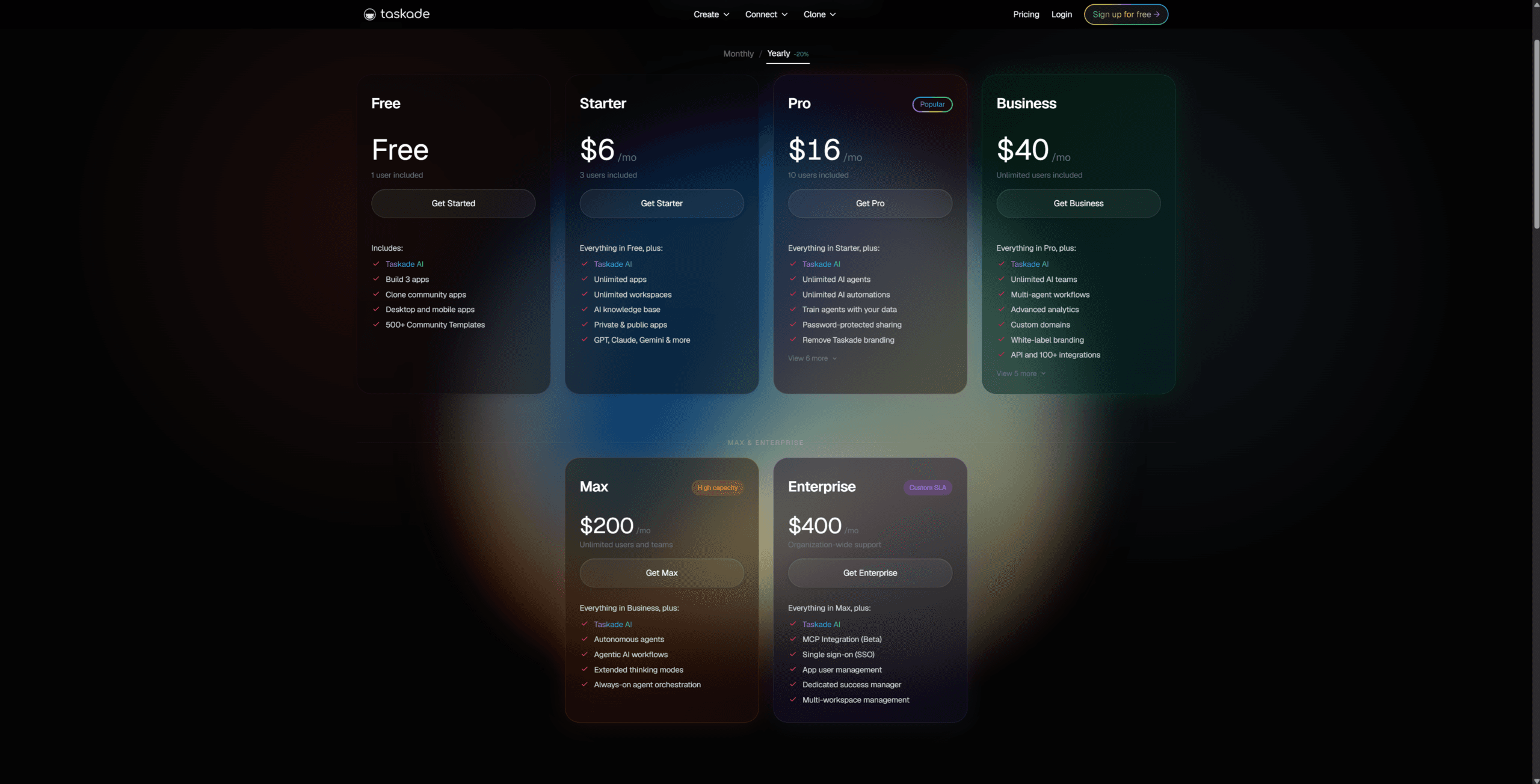
| Plan | Monthly | Users | AI Credits | Best For |
|---|---|---|---|---|
| Free | $0 | 1 | 3,000 one-time | Kicking tires |
| Starter | $6 | 3 | 10,000/mo | Solo + VA |
| Pro | $16 | 10 | 50,000/mo | Small agencies (winner) |
| Business | $40 | Unlimited | 150,000/mo | Scaling teams |
| Max | $200 | Unlimited | Massive pool | Vibe coders |
The credit math matters more than the base price. For example, a Gemini 2.5 Flash query burns 6 credits, Claude Haiku 3.5 costs 8, Claude Sonnet 4 costs 60, GPT-5.2 costs 150, and Claude Opus 4.5 costs 300 credits per query. In practice, Pro’s 50,000 monthly credits cover most mixed workflows unless you’re running Opus-heavy research chains.
Honestly, that pricing conversation sets up the next taskade ai review question better than I expected.
What Makes Taskade Genesis Different?
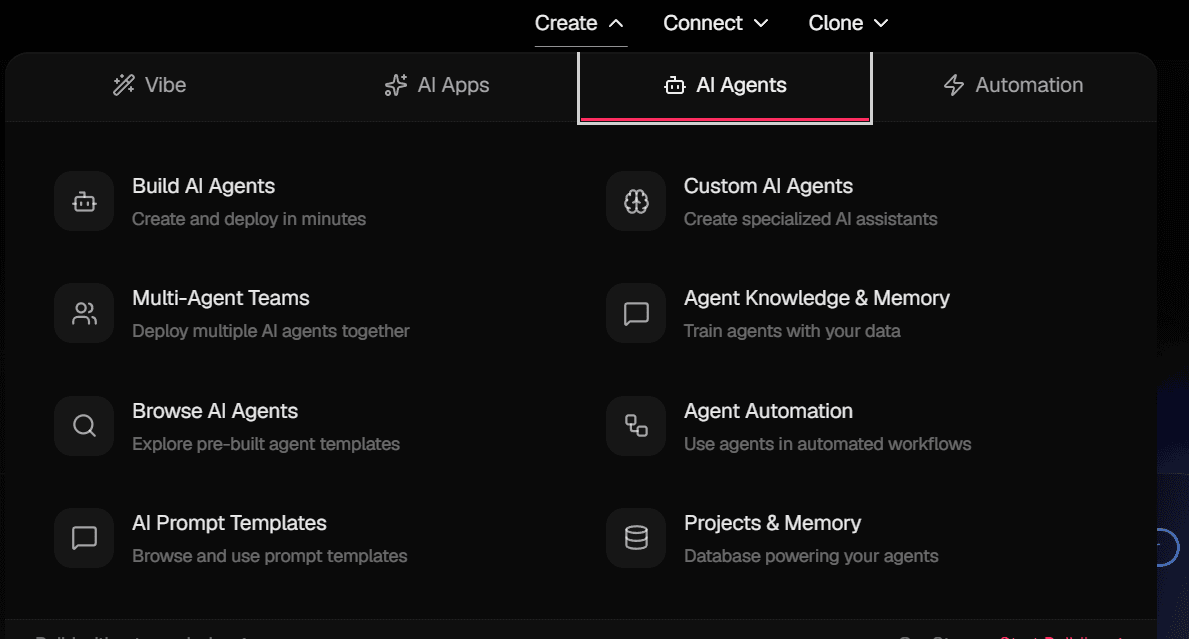
Taskade Genesis compiles working web applications from natural language prompts in 2-15 minutes — think Bolt.new aimed at teams already running projects. It launched in Q4 2025 and has produced 150,000+ compiled apps as of April 2026.
My first Genesis prompt was “build me a client portal” — too vague. The compiled app had a broken form submission and no auth logic. Three rewrites later, I hit something usable: “build a freelance client intake portal with name, email, project type, budget range, and Stripe payment link, store submissions in a table I can filter by budget.” That prompt produced a working deliverable.
Here’s the catch: the output ships as a deployable App Kit package, complete with an embedded database, but it does not export as raw React or Node code. Meanwhile, my research agent started pulling context from an unrelated project I’d built two days earlier. That’s when Workspace DNA — the platform’s shared-memory layer — actually clicked for me.
Personal benchmark: 12 minutes to ship that intake portal in Genesis. The same build in Webflow + Airtable + Zapier would have taken me roughly 3 hours. Honestly, the Genesis feature still has rough edges in 2026, but the trajectory is what makes this taskade ai review conclude it is worth watching. Next comes the pricing philosophy that nobody else is copying.
The Flat-Rate Bet Nobody Else Is Making
Taskade’s pricing is not generosity — it’s a strategic bet that solo operators and 2-3 person agencies represent the future of work. Every competitor (Monday, Notion, ClickUp) charges per-user, which incentivizes headcount growth. Meanwhile, Taskade charges per-team, which incentivizes staying small and AI-leveraged. The pricing IS the product thesis.
Consider the math. Monday.com raised prices 18% in February 2026 and still enforces a 3-seat minimum ($432-$576/year). Notion AI adds $10/user on top of the $8/seat base plan — that’s $216/month for 12 users. ClickUp Brain tacks on $7/user. In contrast, Taskade says “bring 10 users for $16 total, run as many agents as you want.”
Think about it: if AI agents replace headcount (which is the market thesis on every VC deck in Q1 2026), then per-user pricing is a dying business model. Taskade is the only major player who priced for that future instead of the 2018 SaaS past.
The bottom line? You’re not buying project management. You’re buying economic leverage for a team small enough that each person runs 3-5 AI agents. That’s the real product — and it reframes how you should evaluate every feature below.
What I Wish I Knew Before Hour 1
Day 1 assumption going into this taskade ai review: another Notion clone with AI bolted on. By Hour 18, after watching Genesis compile a working client intake portal in 12 minutes, the reframe hit. Taskade isn’t competing with Notion — it’s competing with Webflow, Airtable, and Zapier simultaneously.
Hour 1: skepticism. I opened the dashboard and assumed “great, another dashboard.” Hour 4: mild interest. The 8-view system (List, Board, Table, Calendar, Mind Map, Org Chart, Action, Chat) is genuinely more flexible than Notion’s 5 views. Hour 18: lean-back moment, documented above.
Around Hour 30, I tried editing a project from my phone at a coffee shop. The mobile app lagged so badly I almost closed the tab for good. What kept me going? A buried Discord thread mentioned the mobile editor regressed after the Genesis launch — a known issue with a patch in the pipeline. For example, the desktop experience stayed smooth the whole time.
Knowledge gap I’ll admit openly: I burned through 5,000 AI credits in one evening before realizing Claude Opus costs 300 credits per query while Gemini Flash costs 6. Honestly, I still don’t fully understand how Workspace DNA scores memory relevance under the hood, but empirically, the shared context made my second agent 3x faster to set up than my first. Now let’s see how it stacks up against the competitive set.
Taskade vs Notion vs ClickUp vs Monday
For 10 users, Taskade Pro costs $16/month total, while Notion with AI runs $200/month, ClickUp with Brain runs $170/month, and Monday runs $348+/month. In other words, the per-user competitors cost 10-20x more at small-team scale.
| Feature | Taskade | Notion AI | ClickUp Brain | Monday AI |
|---|---|---|---|---|
| Pricing Model | Flat (per team) | Per user + add-on | Per user + $7 add-on | Per user, 3-seat min |
| Pro Cost (10 users) | $16/mo | $200/mo | $170/mo | $348+/mo |
| AI App Generation | Yes (Genesis) | No | No | No |
| Project Views | 8 | 5 | 15+ | 10+ |
| Performance at Scale | Optimized | Lags after 5K records | 90s load times | Stable enterprise |
| Offline Mode | No | Limited | Limited | Limited |
To be fair, my taskade ai review has to acknowledge that ClickUp Brain gives you 15+ views and Monday is stable at enterprise scale. Meanwhile, neither can touch Taskade’s cost structure for teams under 15 people. Still, the taskade ai review trade-offs below deserve an honest list.
Pros and Cons After 48 Hours
✅ Pros
- Flat-rate pricing destroys per-user math for 3-10 person teams
- Genesis compiles working apps in 2-15 minutes
- 11+ frontier models selectable per agent
- 1,000+ templates cover most common workflows
- Native video, voice, and screen share embedded per project
❌ Cons
- Zero offline mode on desktop (critical gap)
- Mobile editing degraded after Genesis launch
- AI credit math not transparent upfront
- No raw code export from Genesis apps
- Billing transparency complaints on G2
Look, the offline gap is the one that stings hardest for traveling operators. However, every other limitation has a workaround. Next, who should walk away?
Who Should Skip Taskade AI
Skip this taskade ai review recommendation if you work offline regularly, need raw code export, or run a 50+ person enterprise with granular permission needs. Specifically, field teams, compliance-heavy orgs, and developer-led shops that want to own the codebase will be happier elsewhere.
For comparison, if your pain point is meeting notes rather than project orchestration, my best AI meeting assistant for Zoom calls breakdown covers better-suited options. Meanwhile, ADHD founders juggling schedule-first workflows should read the Reclaim AI vs Motion comparison before signing up here.
My Final Taskade AI Review Verdict
Remember the decision point I teased in the opening of this taskade ai review? Here it is: if your team is 1-10 people running AI agent workflows, Taskade’s flat-rate model saves you $1,000+/year versus competitors while unlocking Genesis. If you’re 50+ people with compliance needs, walk away.
My go-to recommendation after 48 hours: start on the $6 Starter plan to validate, then jump to Pro once you hit 4 teammates. Ready to dive in? Check Taskade’s current pricing at taskade.com.
Frequently Asked Questions
Is Taskade AI better than Notion for solo entrepreneurs?
For solo operators and micro-teams (1-10 users), Taskade’s flat-rate $16/month Pro plan beats Notion’s per-user AI pricing by a wide margin. Notion is stronger for pure documentation and wiki-style knowledge bases, while Taskade wins for execution and AI agent orchestration. Specifically, Notion AI adds $10/user on top of the $8/seat base plan, so a 10-person team pays roughly $200/month for AI features that Taskade bundles at $16.
How do Taskade AI credits actually work?
Credits are consumed only when you query frontier AI models or run Genesis builds. Standard task management and webhook automations use zero credits. Specifically, a Gemini 2.5 Flash query costs 6 credits; Claude Haiku 3.5 costs 8; Claude Sonnet 4 costs 60; GPT-5.2 costs 150; Claude Opus 4.5 costs 300. Pro’s 50,000 monthly credits cover most mixed workflows unless you’re running Opus-heavy research chains, per the Taskade Help Center.
Can I use Taskade AI offline?
No. Taskade requires an active internet connection on desktop. Mobile apps offer read-only offline mode, not editing. This is the platform’s most significant limitation as of April 2026, though Taskade has publicly stated full offline support is in development. In practice, traveling operators, field teams, and flight-heavy consultants should plan around it or pick a desktop-first tool like Otter for on-device workflows.
Is the Taskade Pro plan worth $16 per month?
For any team of 3+ users running AI workflows, yes. Specifically, the flat-rate model means adding users costs nothing until you hit 10 seats — that’s a $200/month saving versus Notion AI for the same team size. Solo operators may find the $6 Starter plan sufficient unless they need frontier models or the 5GB knowledge base. In practice, the break-even point is around user number 2 or 3.